Firefly 1.0.3: Decode Tree, Apple message data, SQLite recovery and more
Firefly 1.0.3 gives examiners new ways to move from complex stored data to findings that can be reviewed and explained. Follow supported nested formats layer by layer, reconstruct supported message elements from Apple TypedStream data stored in attributedBody, and examine surviving SQLite material in page free space and freelist trunk pages.
Throughout the workflow, source locations, methods, coverage and limitations remain connected to the result.
Go beyond decoded output. Keep findings connected to their source.
Learn more about Elusive Data Firefly .
What is new
Decode Tree and Decode Report
Decode supported nested values layer by layer, then export a self-contained record of the decoding path.
Apple messages
Parse TypedStream data stored in attributedBody and reconstruct supported message elements from the stored record.
SQLite recovery
Examine page free space and freelist trunk pages with source, status, coverage and limitations recorded.
Raw SQLCipher keys
Use an already recovered raw SQLCipher key in its supported native hexadecimal form.
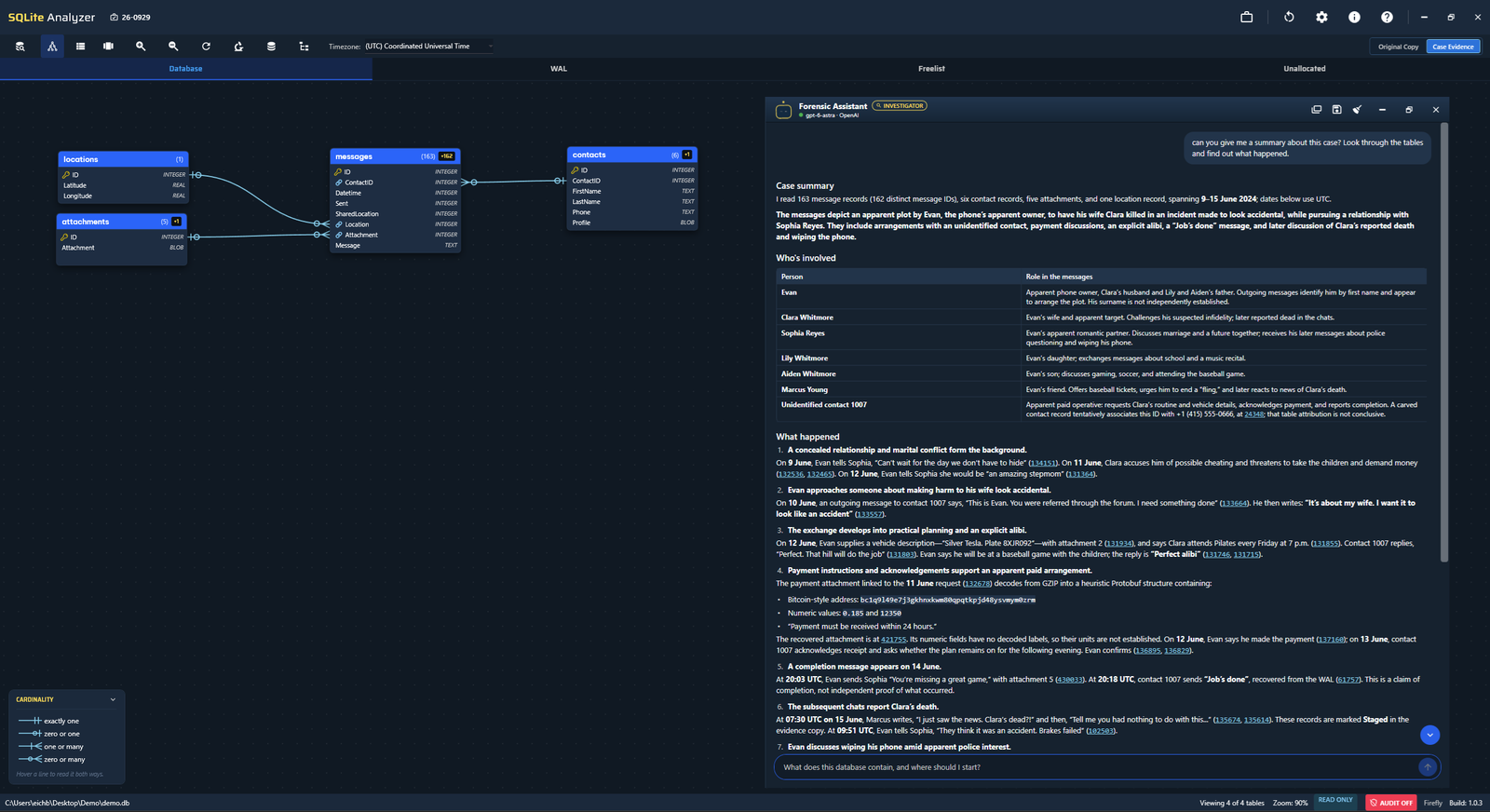
Forensic Assistant
Work with the open case using read-only tools, linked byte offsets and optional forensic audit logging.
Updates and utilities
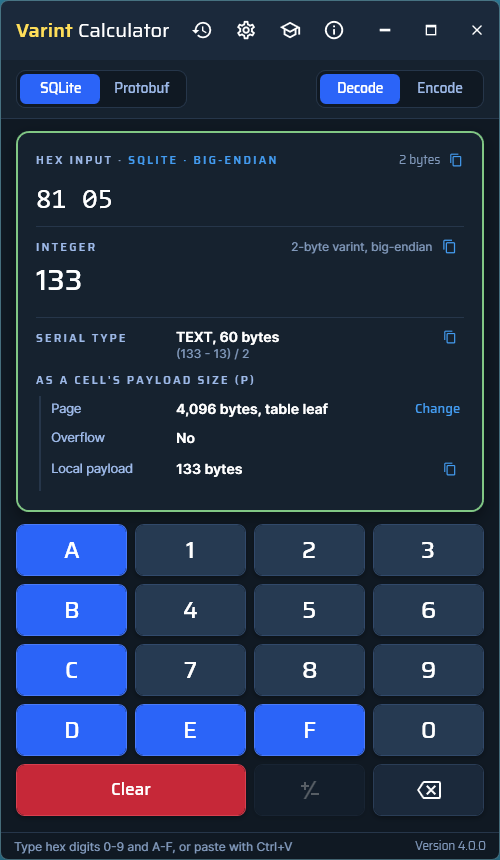
Get verified update offers. Open the standalone Varint Calculator 4.0.0 from the Utilities row.
See what is new in Firefly 1.0.3
Decode Tree and Decode Report
Supported nested formats can be examined layer by layer while the path back to the parent value remains visible.
Each decoded layer stays connected
Decode Tree works across supported compression, text encodings, protobuf, plists, archives and Apple TypedStream. It is available from its own landing-page card and from content viewers, including SQLite and LevelDB.
Each layer retains its bytes, SHA-256 hash and precise position in its parent. Selecting a node highlights the corresponding bytes in the hex view.
Signature-backed readings and inferred interpretations remain visibly distinct. Timestamp confidence is shown, and adjacent coordinates can be plotted as inferred.
The Decode as menu contains 33 decoders grouped by kind. An examiner can force a decoder, supply an XOR key, run one-byte brute force, scan for QR or barcode data, or import a .proto schema.
Manual steps are recorded and replay when the work is imported.
A self-contained decoding record
Decode Tree generates an offline HTML report designed for review and reproducibility. The report includes:
- Per-tree manifests and the full hash formula.
- Case and examiner identity, exact Firefly build and UTC generation time.
- Extracted values, images, URLs and email addresses.
- An optional AES-256 encrypted archive of extracted bytes.
- Explicit labels for truncated material and findings that depend on manual steps.
- JSON export with a hash-verified replay, so another examiner can reproduce the reading.
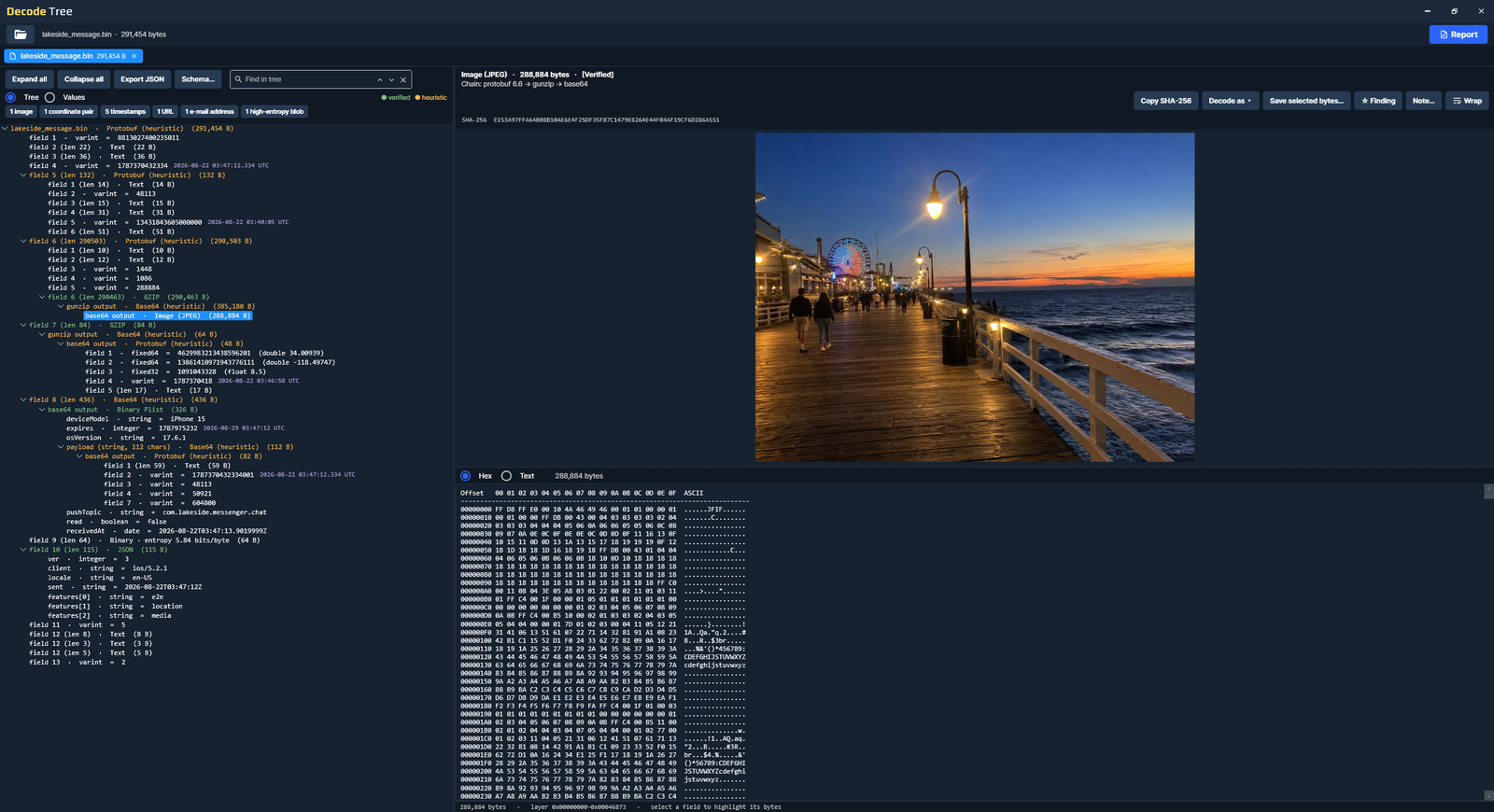
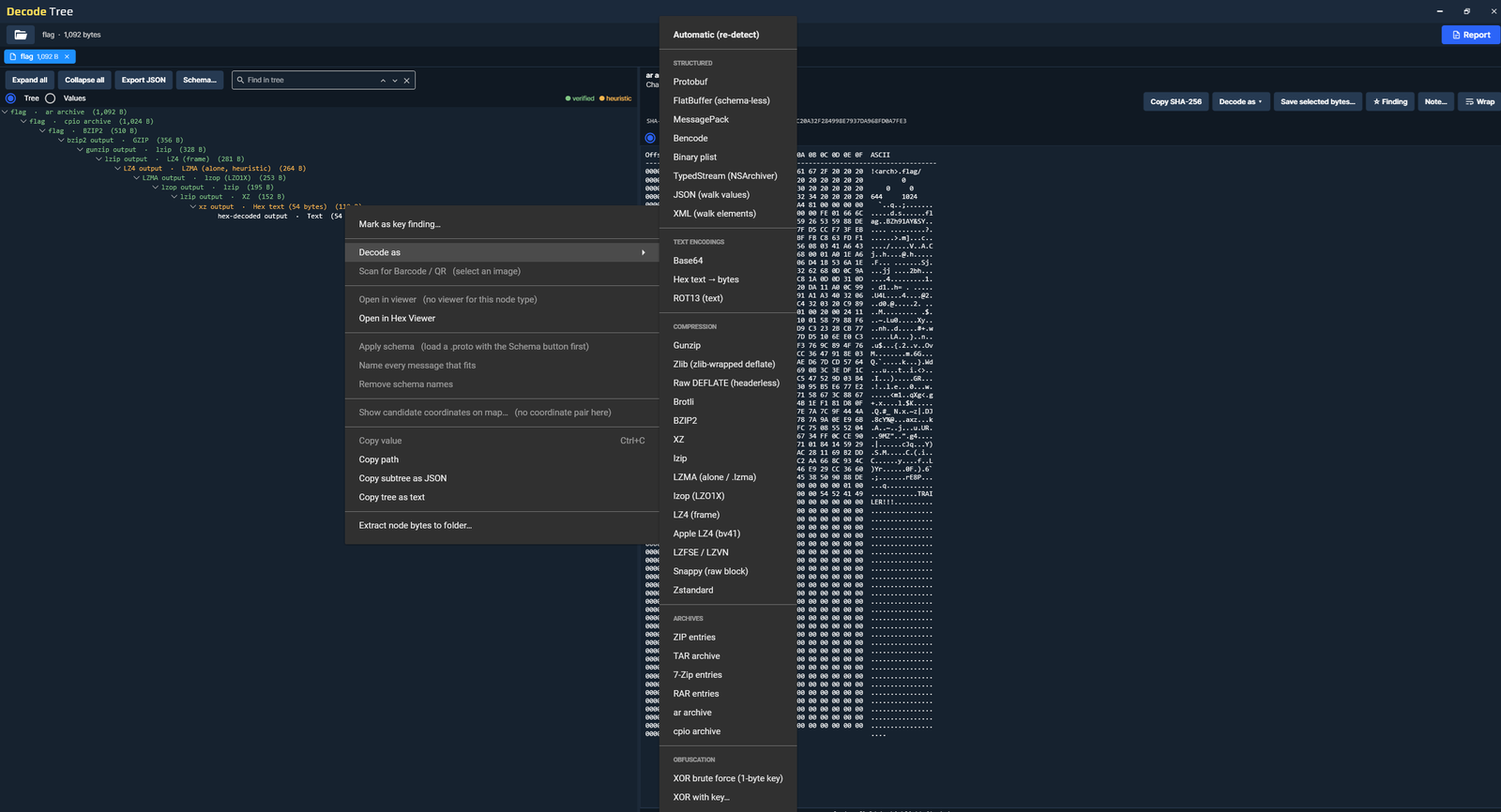
Signature-backed readings and inferred interpretations are shown differently to make the basis of the decoding clear.
Apple TypedStream and Message Preview
Firefly parses supported message data stored in attributedBody and connects the reconstructed elements to the fields behind them.
Read supported data in attributedBody
Firefly parses Apple TypedStream message bodies stored in attributedBody, including text, styling runs, links, attachment placeholders, mentions and one-time codes.
Stored data detections can include dates, money amounts, phone numbers, addresses and calendar events.
Mismatches between stored ranges and the displayed text are flagged.
TypedStream to text and TypedStream to attributes can be applied to an entire column.
In one reviewed iPhone extraction, more than 75,000 message bodies parsed and more than 6,000 stored data-detector results were read.
Reconstruct supported elements from the stored record
Where the records support them, Message Preview can show message direction, stored timestamps and receipts, links, attachments, rich-link cards, reactions and history, edits, replies, effects and group sender information.
Attachments are matched through recorded identifiers. Missing, wrong-size or out-of-extraction files are not displayed as valid attachments.
Files open read-only in Firefly’s viewer with SHA-256 shown.
Rich-link content comes from the stored preview. Firefly does not fetch it from the internet. Picture thumbnails remain off by default and can be enabled for the session.
Selecting a preview element reveals the fields that produced it. The same reconstruction and provenance can follow into the Decode Report and exported finding.
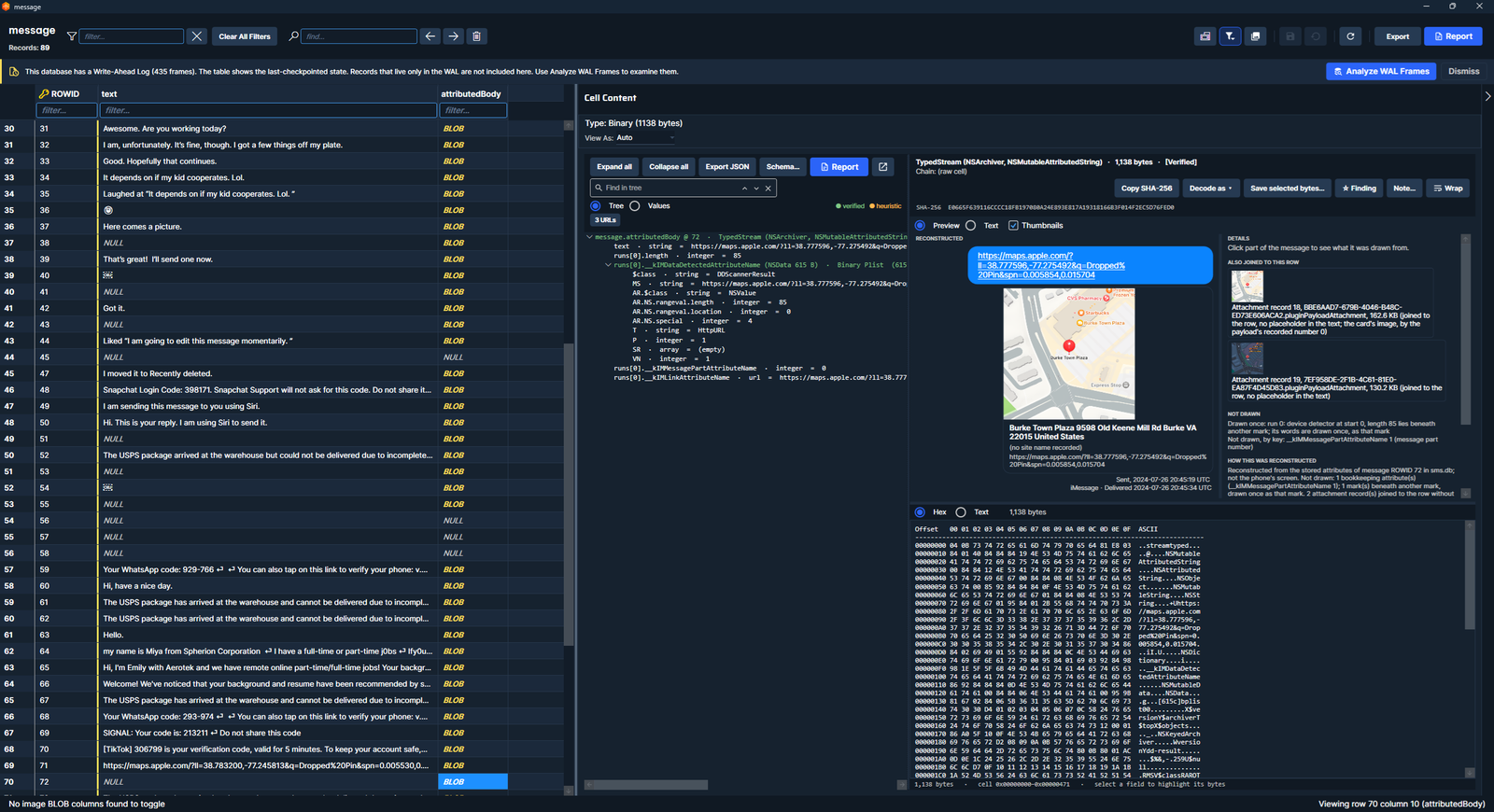
The preview is a reconstruction from the stored record. It is not a screenshot of what the user saw, and omitted elements are listed by name.
Page free space and freelist trunk pages
New recovery workflows expose what was examined, how a result was produced and where the method reached its limits.
Visualize and examine page free space
The Unallocated tab shows space inside SQLite pages that live records do not occupy and scans it for surviving record material.
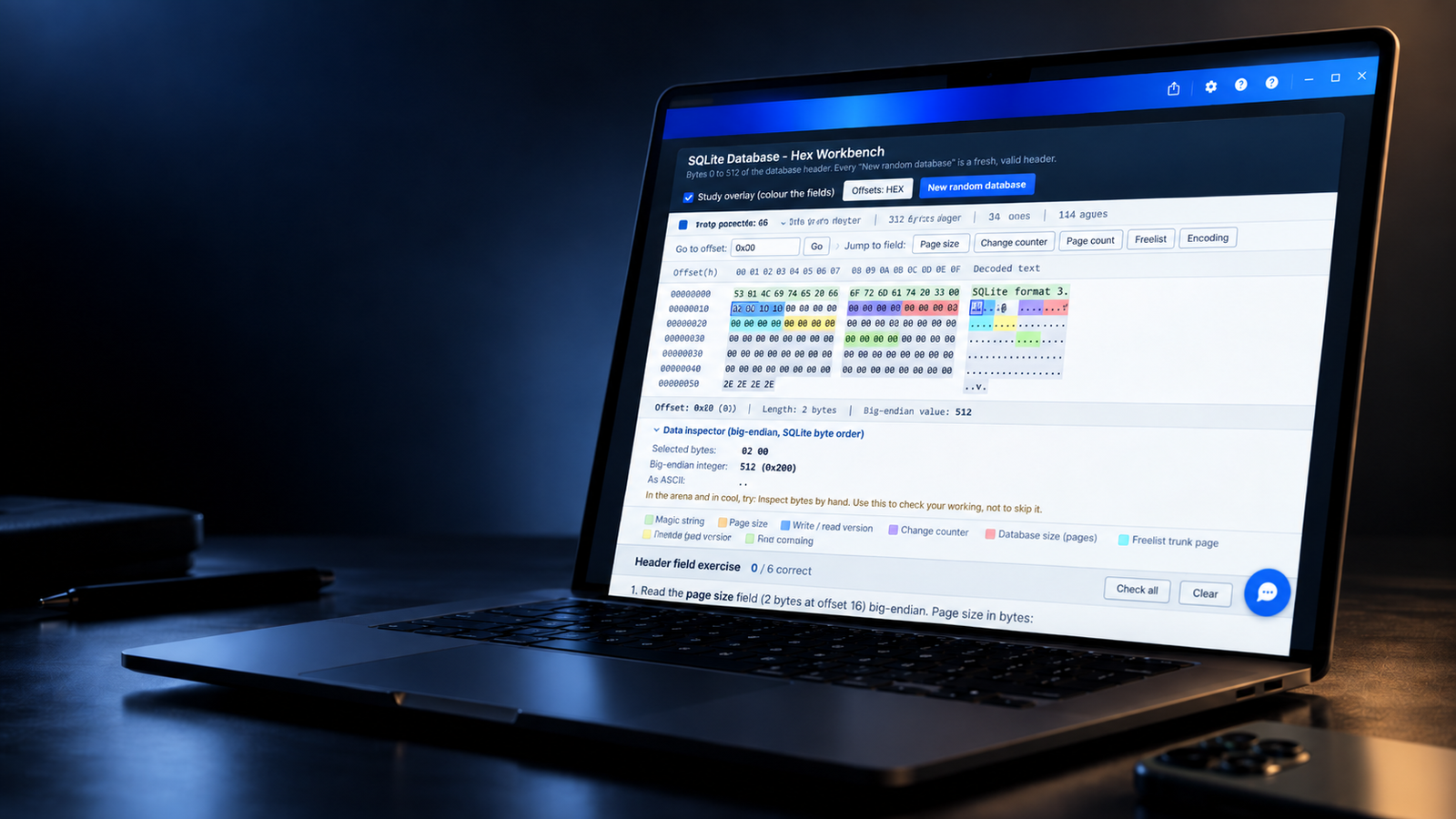
Page views distinguish free space containing old bytes from empty space and support filtering by table or content before opening the page in Hex Workbench.
Two carving profiles address intact records and records whose first bytes were overwritten.
The source receives a SHA-256 fingerprint and remains locked against changes during the run.
Results use Complete, Disputed, Partial or Provisional status. Only a Complete record with its own ID and no contradiction can sit beside live rows, never over them.
Coverage, exclusions and method limits follow results into CSV, saved cases and reports. Reopened results are checked against the original bytes.
Classify and carve freelist trunk pages
SQLite tracks freed pages through a freelist structured with trunk pages. A trunk page can retain recoverable material even after SQLite has written the chain over its former header.
Firefly classifies and carves freelist trunk pages, including databases whose freelist contains only trunk pages.
Surviving pointers and schema-based scans locate recoverable material, with provenance attached to the result.
Recovery summaries identify trunk pages that could not be carved. Audit logs also record this information when logging is enabled.
An overflow chain stops when it reaches a page later reused as a trunk and marks the overwritten bytes instead of treating trunk bookkeeping as record content.
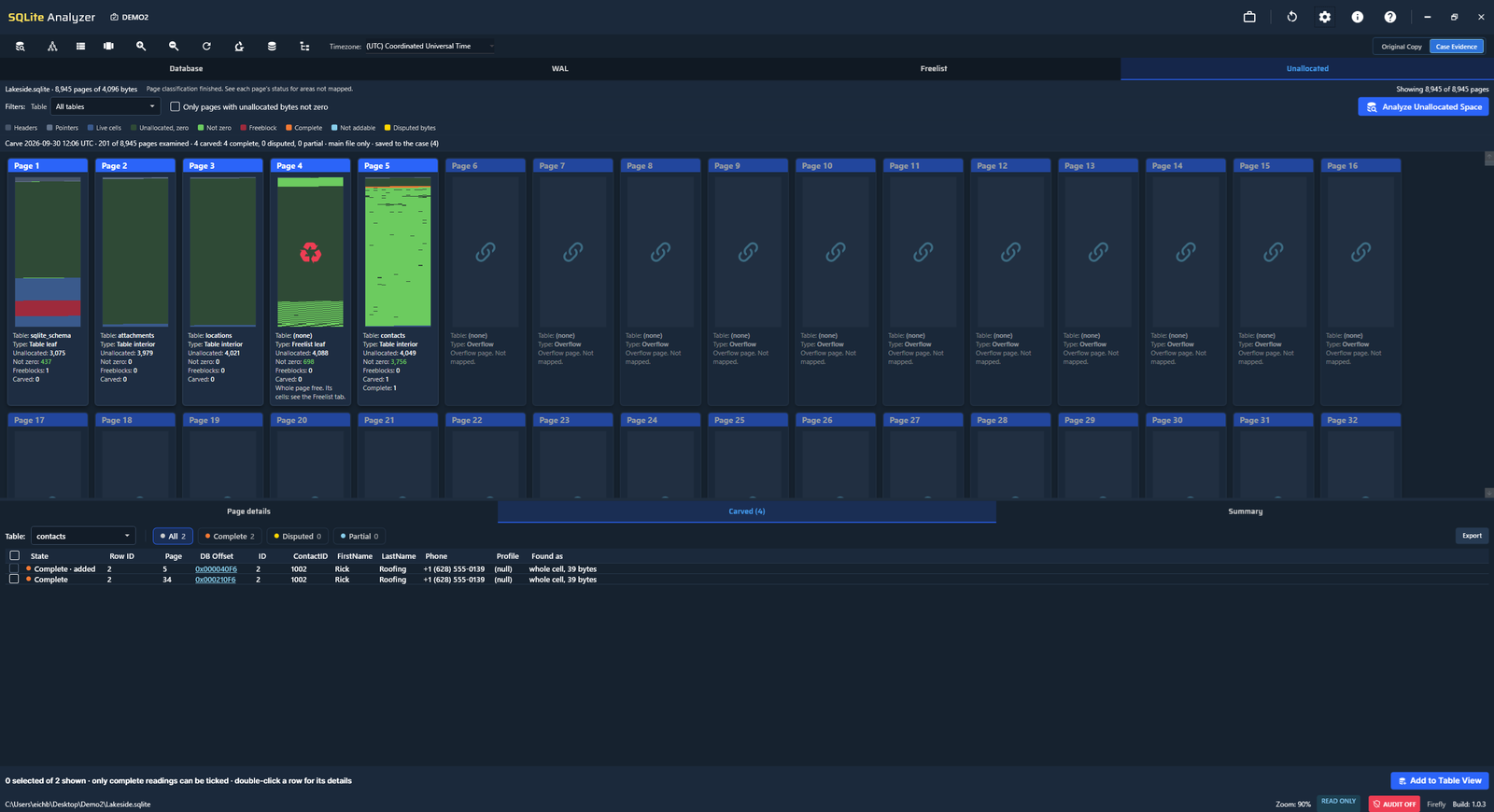
Surviving bytes in page free space do not, by themselves, prove that a row was deleted or establish when.
Raw keys, assisted analysis and verified updates
Use recovered SQLCipher keys, investigate the open case with read-only tools, and receive hash-verified update offers.
Use an already recovered raw key
Recovered raw SQLCipher keys can be entered in x’…’ hexadecimal form: 64 characters for a 32-byte key or 96 characters when the salt is included.
A capital X, lowercase hexadecimal and surrounding spaces are accepted. Other input remains a passphrase.
Database, WAL, journal and password-list operations interpret keys consistently. Passphrase handling is unchanged.
Testing covered real SQLCipher 4 databases for both key forms and nine near-miss keys that Firefly correctly rejected.
This is key-format support. Firefly does not recover the key or break an application’s encryption.
Investigator Mode works on the open case
Investigator Mode uses the analyzer’s read-only queries, BLOB decoding and freelist, WAL and journal carving. Answers can link byte offsets directly into Hex Workbench.
When enabled, the forensic audit log records questions, tool calls and answers for review.
Investigator Mode supports the listed cloud models from Anthropic and OpenAI, or a model accessed through the Local LLM setting. Local LLM uses the endpoint you configure; Firefly does not verify that it runs on the same machine.
With the Locked down content policy, cloud requests can include schema information such as table and column names, and the database filename. In Investigator Mode, they can also include row counts, a cell’s detected type and size, and timestamp readings of values supplied by the model.
Verified update offers and Varint Calculator
From 1.0.3 onward, Firefly can check once a day at launch or on demand for a newer build. The setting can be disabled.
The correct x64 or ARM64 installer is verified against its published SHA-256 before installation.
The application payload sends the product version and no case or evidence content for the update check.
Customers on 1.0.2 must install 1.0.3 manually once to receive later in-app update offers.
Varint Calculator 4.0.0 handles SQLite and protobuf varints, serial types, local payload size and overflow. It remains available as a free standalone utility.
Answers can link to source locations. When enabled, the forensic audit log records questions, tool calls and answers for review.
Other improvements and verification
Workflow improvements in reporting, value inspection and navigation, supported by development testing and automated checks.
Trust, reading and interface details
Evidence handling
Generated HTML reports and built-in help no longer load external resources and can open without outbound network access.
Firefly’s internal working tables are hidden from the source table view.
Evidence working copies are validated, repaired or refused rather than used without checking. Original evidence remains unchanged.
Reading values
A value inside a plist appears inside its plist with the line selected.
Long text cells remain text rather than becoming a hex dump, and reports preserve line breaks.
Interface
Row context menus group decoding actions and organize decoders by kind.
Action buttons use Firefly accent blue, and light-theme readability improves across decoding surfaces.
Routine confirmations move from dialogs to the status line.
Maps, queries, help and installer
SQLite Analyzer route playback can leave a toggleable blue trail.
The SQL panel opens in Forensic mode with query templates ready to use.
Help covers Decode Tree and the column timestamp list. The installer checks the CodeMeter runtime version.
How the release was tested
Development testing includes reproducing defects, checking fixes and adding regression tests.
More than 1,000 automated checks run on each build.
These results describe development testing, not external certification.
See Firefly Live
Firefly 1.0.3 was released on 6 October 2026. Read the complete release notes or visit the Firefly product page for more information.
Firefly 1.0.3 Release Notes
Download PDF