Reduce the risk of missed or misinterpreted app evidence.

Go beyond decoded output

New release · Firefly 1.0.3 · See what is new

When decoded output is not enough, the investigation doesn’t stop

A decoded view shows what the parser surfaced. It cannot tell you whether relevant data was left behind.

Mobile devices create a constant stream of app data evidence. Extraction brings that data into the case, but decoded output is not the end of the investigation. No parser covers every app, an app update can change the schema the app writes, and a result that carries weight in a report is worth checking against the data it came from. Going deeper often means moving between separate tools, and every hand-off between tools is a point where evidence can be missed, or misinterpreted.

Firefly keeps that work in one connected workspace, working from the files the extraction already produced, with every finding tied to its source.

One connected workspace to continue the examination after extraction

Recover, examine, decode, validate, trace and report app data in one workspace, working from the files the extraction already produced.

Built for the formats apps use, on mobile devices and computers: SQLite and SQLCipher, RealmDB, LevelDB, IndexedDB and Apple Biome. The work continues even when no tool supports the app.

The original evidence stays untouched, every finding is traced back to its source and every step is recorded in the audit log, so the work is easy to check and explain.

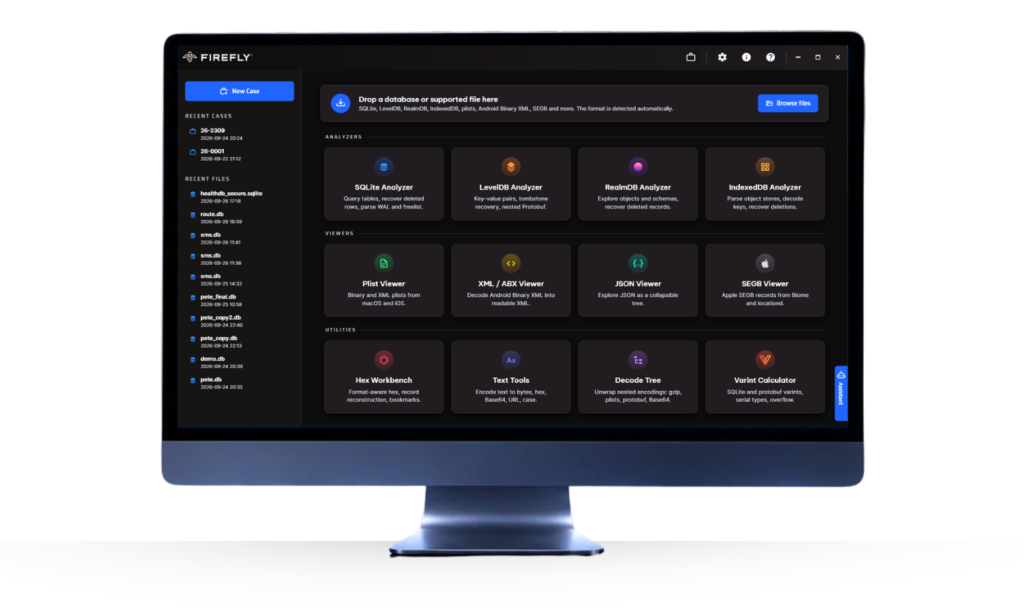
Firefly workspace: one connected launcher for the SQLite, RealmDB, LevelDB, IndexedDB and Apple Biome analyzers, viewers and forensic utilities.

Why add Firefly to the toolkit you already have?

Findings you can stand behind. Keep working when the decoded output is incomplete, unsupported or needs validation, with the source visible and the original evidence untouched.

Coverage

When the parser stops

Open the underlying app data and keep working, on the files the extraction already produced. SQLite with its WAL and journal, RealmDB, LevelDB, IndexedDB and Apple Biome, from phones and computers. Nested values inside a BLOB, such as protobuf, plists, Base64 or gzip, open layer by layer.

Recovery

What is still in the file

Examine recoverable historical and deleted records where the data survives in the source files, and see where each one came from: WAL frames, rollback journals, freelist pages or freeblocks. An earlier version of a row is reported as an earlier state, not flattened into a deletion.

Provenance

Where it came from

Keep findings connected to their source. Trace an interpretation back to the file, page and byte offset, check an important value against the raw bytes, and find every step recorded in the audit log and carried into the report.

Validation

A second reading of a key finding

Different tools read the same bytes differently, which is why labs run more than one. Firefly gives an important finding an independent examination and keeps the analysis context with it, so another examiner, a quality reviewer or a court can follow how the conclusion was reached.

Evidence integrity

The original, left untouched

Firefly works from hash-verified copies validated with SHA-256. The original evidence is not altered, so examiners can recover, review and report while keeping the source intact.

Existing workflow

Extend your existing toolkit

Keep the extraction platforms already in the case, and bring recovery, interpretation, validation and reporting together on the examiner's own workstation. The built-in Forensic Assistant, an AI that works through Firefly's own forensic tools on the working copy, helps examiners question the data, with every question and answer recorded in the audit log.

See where Firefly fits in your existing workflow

Firefly complements the forensic tools you already use. See the workflow in a demo, or start with the brochure.

From recovery to reporting. Stay connected to the source.

Follow the evidence from an unfamiliar app database to a report others can check, with a clear path back to the underlying source.

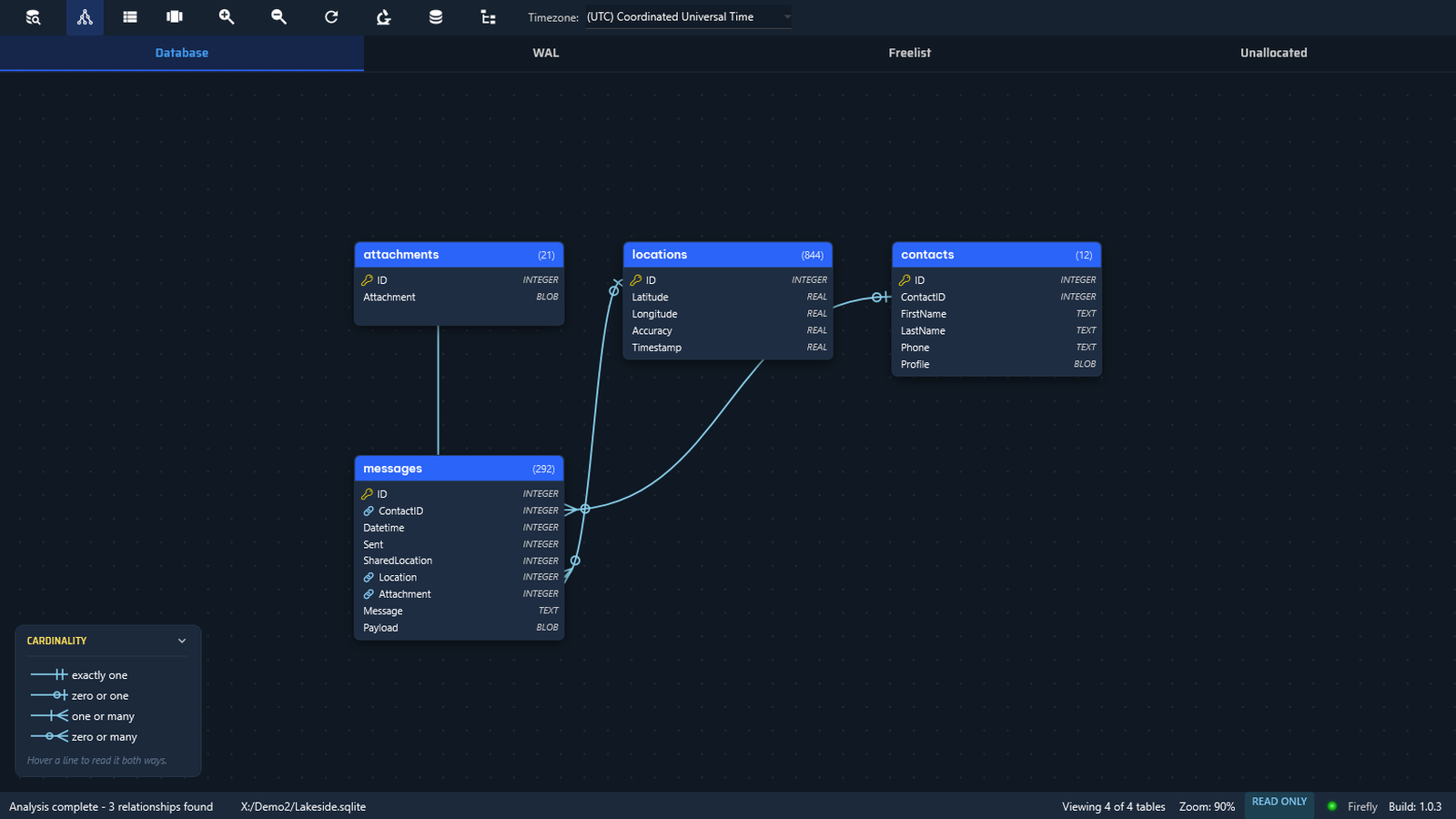
  1. Firefly database canvas showing every table with its record count, columns and relationships
    01 / Explore

    Open any app database

    See every table with its record count, columns and declared relationships, and search all tables at once. The search also says what it did not cover, so a missing hit is never read as absence.

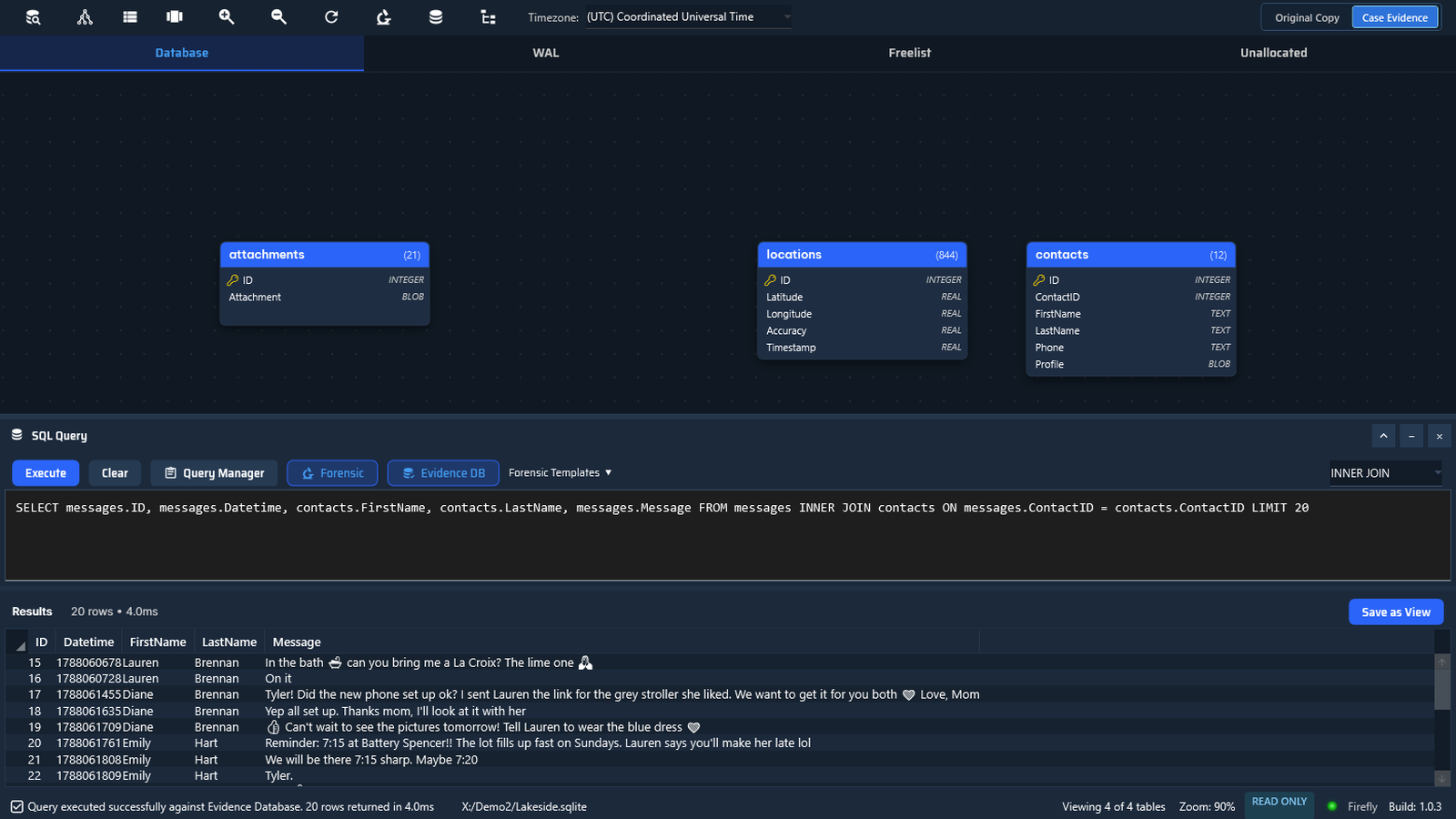
  2. Firefly SQL panel with a join across messages and contacts and its read-only results
    02 / Query

    Ask across tables

    Join messages, contacts and places by right-clicking the canvas, without writing SQL. The query stays visible and editable, and the results come back read-only.

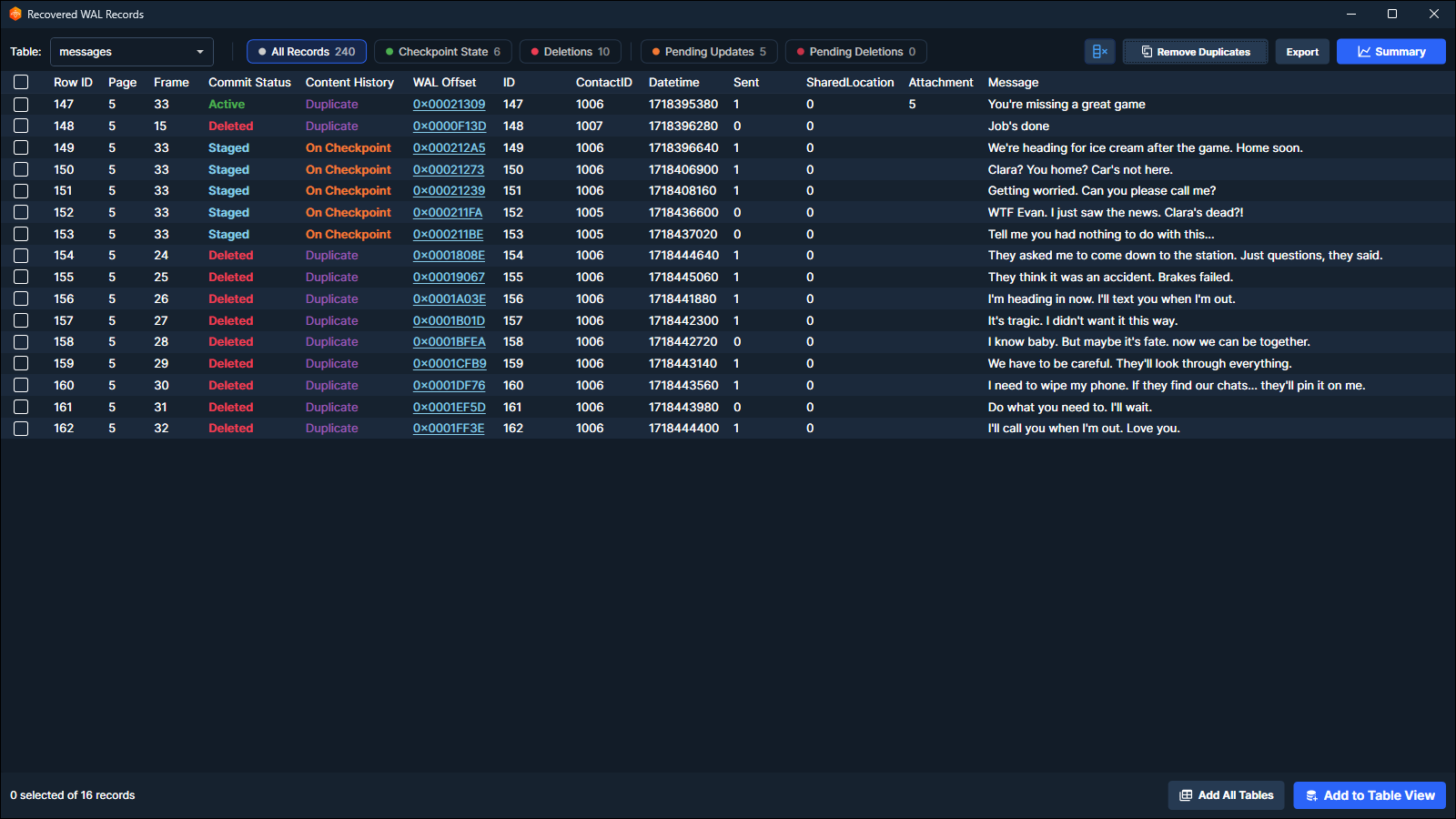
  3. Firefly recovered records view showing recovery and source context
    03 / Recover

    Recover what remains

    Investigate historical or deleted records where recoverable data remains in supported source files. What can be recovered depends on the files available and the condition of the data.

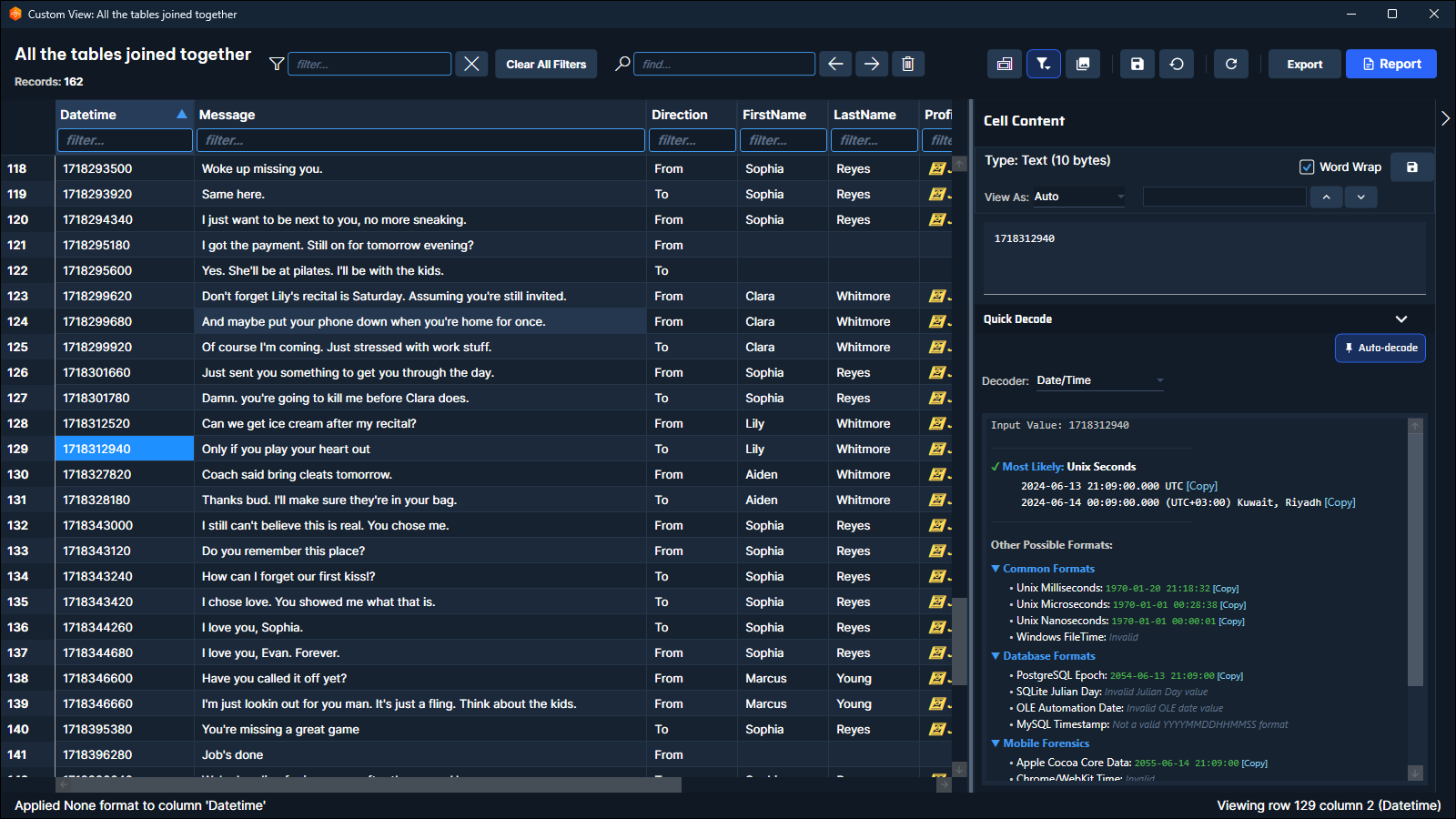
  4. Firefly analysis view showing records, timestamps and interpretation context
    04 / Interpret

    Understand data in context

    Review records, timestamps and nested content alongside the structures they belong to. Decoded readings are marked as verified or heuristic, so you can see what rests on structure and what is an inference.

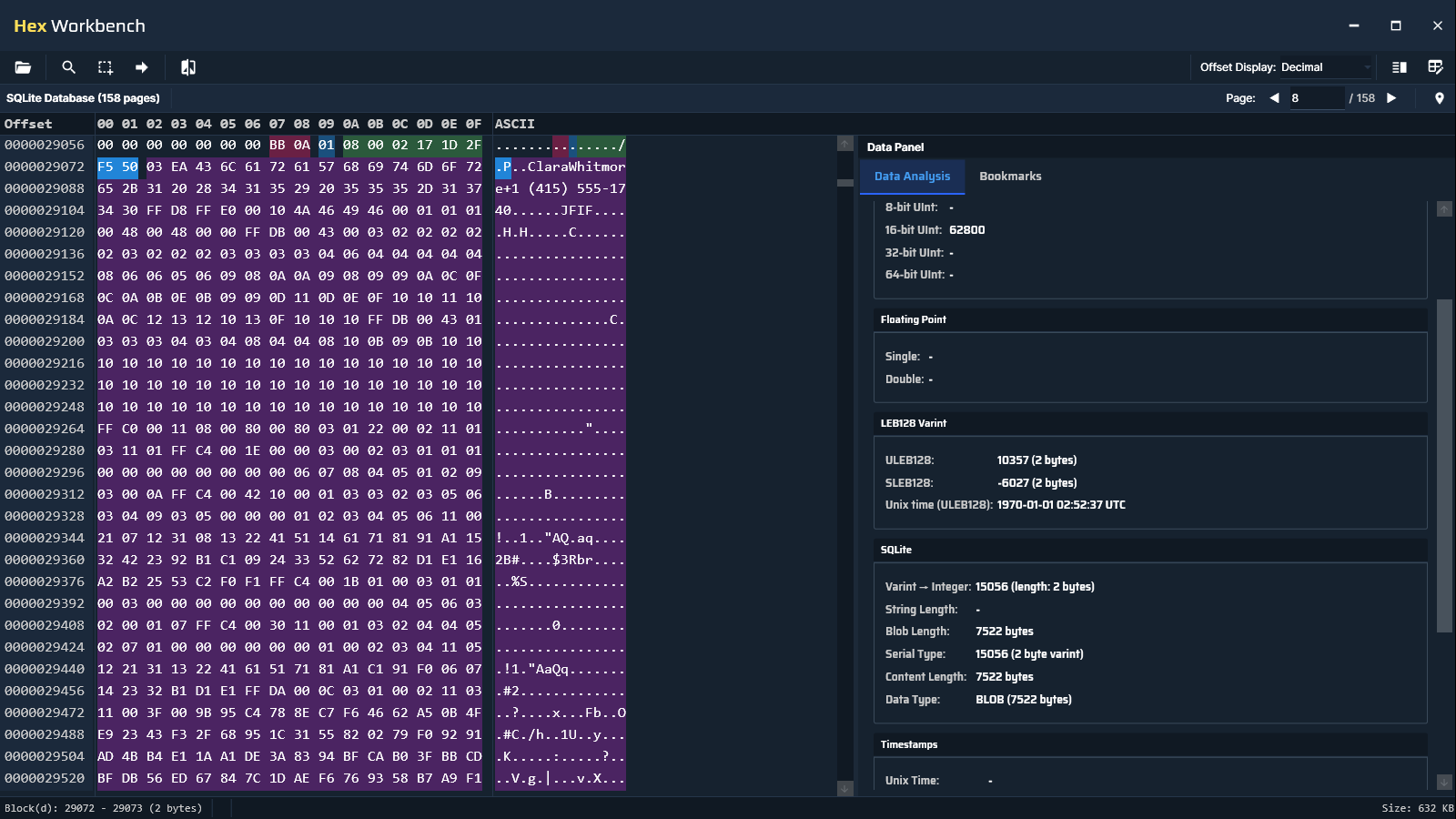
  5. Firefly Hex Workbench showing the source behind an interpretation
    05 / Validate

    Trace findings to the source

    Inspect the source behind an interpretation, including file, page and byte offset where applicable, and examine the underlying bytes in Hex Workbench when needed.

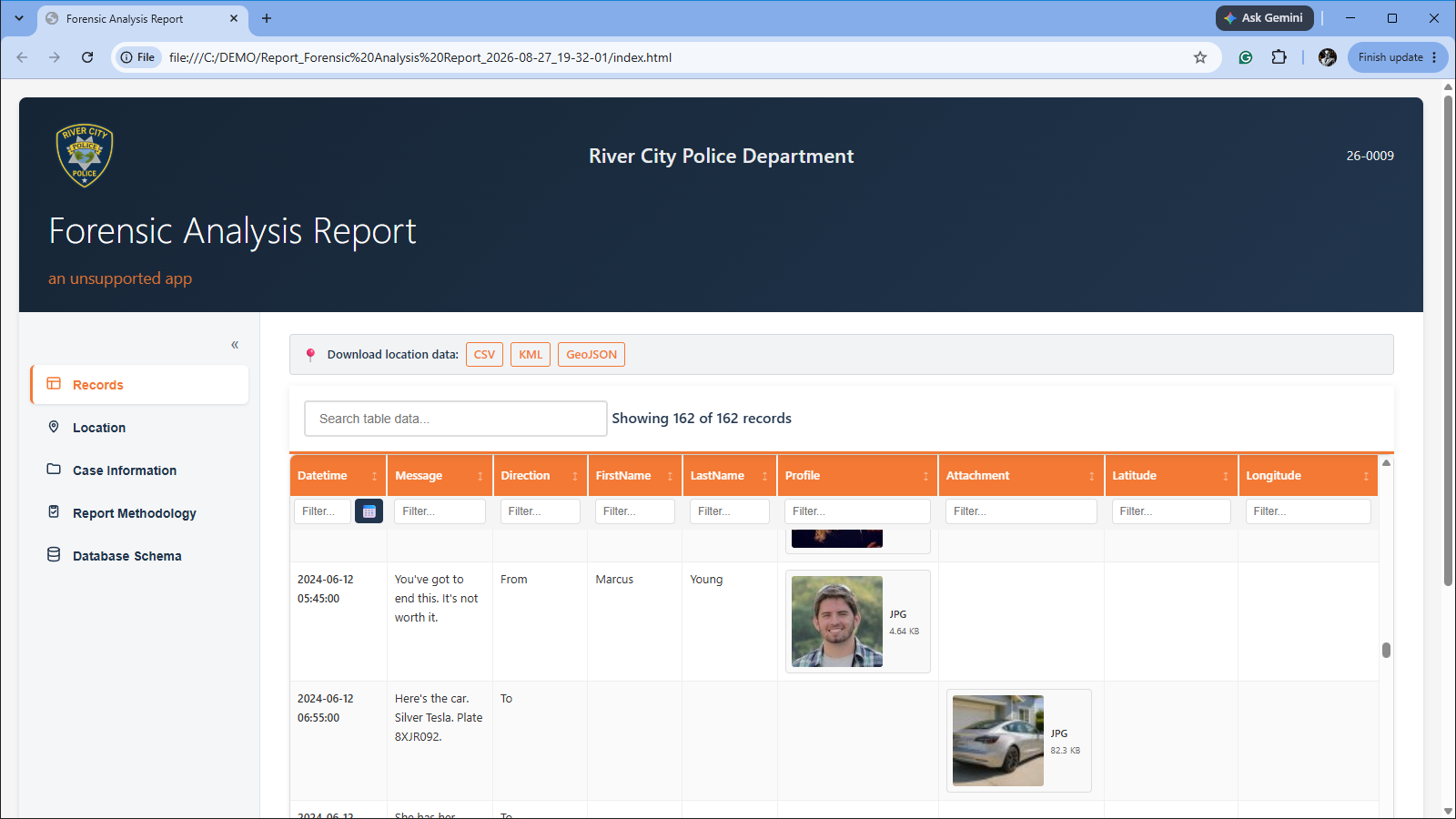
  6. Firefly interactive HTML report preserving analysis context
    06 / Report

    Carry analysis into reporting

    Create interactive HTML reports that preserve the examiner's working view, with the file hashes and the methodology built in, so others can follow and check the analysis.

Read-only on a working copy · Every step on record · Runs on your workstation

Watch the full workflow · 2:36

From Question to Reviewable Finding: A Full SQLite Case

Inside Firefly

Built for the databases and supporting files modern apps use

Examiners open the relevant files or folders from an extraction, then work through supported databases, nested content, surviving record data and available source context in one specialist workspace.

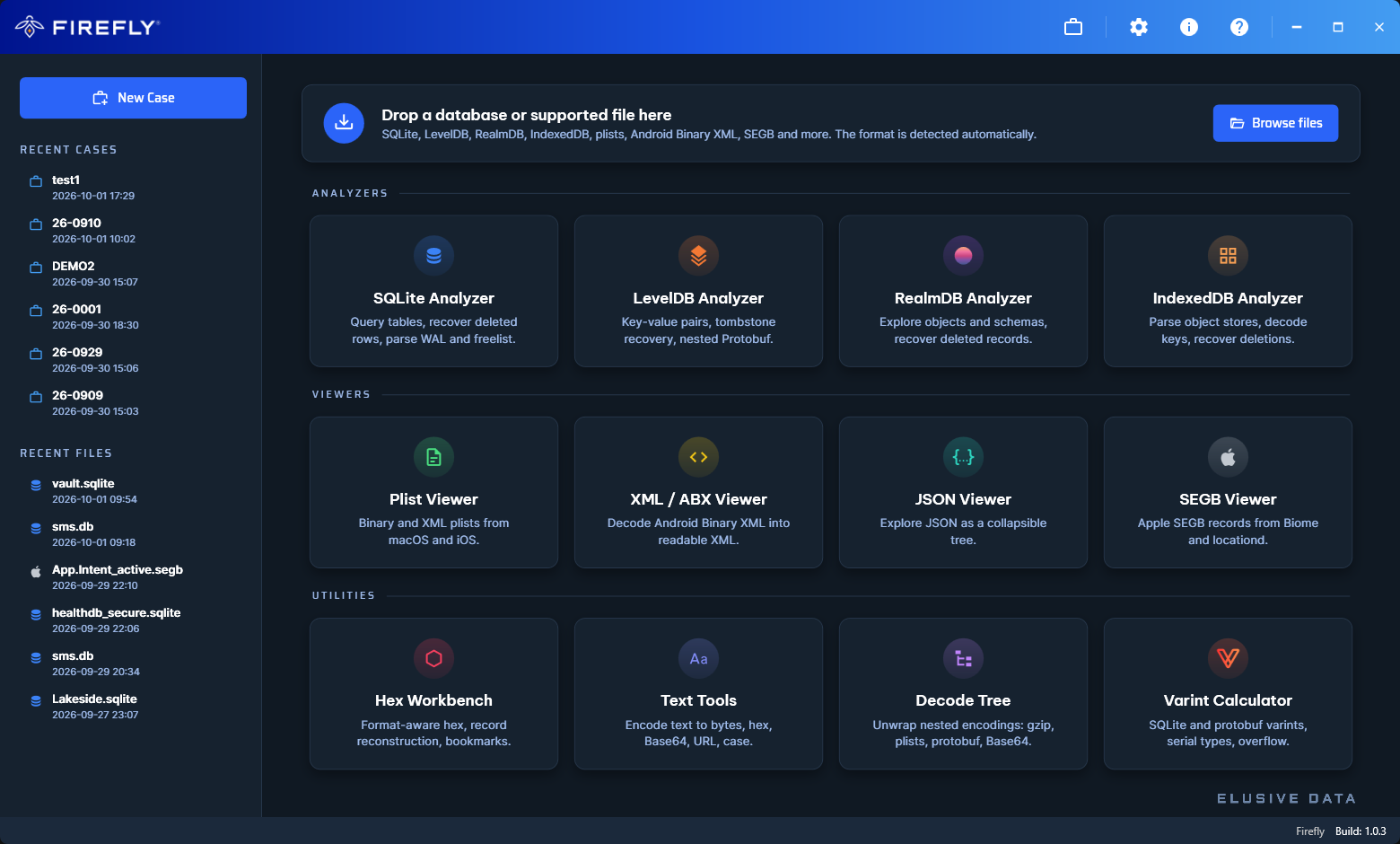
Firefly start screen with analyzers for SQLite, LevelDB, RealmDB and IndexedDB, viewers for plists, XML, JSON and SEGB, and the Hex Workbench and Decode Tree utilities
Analyzers

App databases

Examine SQLite, Encrypted SQLite (SQLCipher), RealmDB, LevelDB and IndexedDB with dedicated analyzers. Shared viewers and Hex Workbench keep deeper examination in the same workspace.

SQLite SQLCipher RealmDB LevelDB IndexedDB
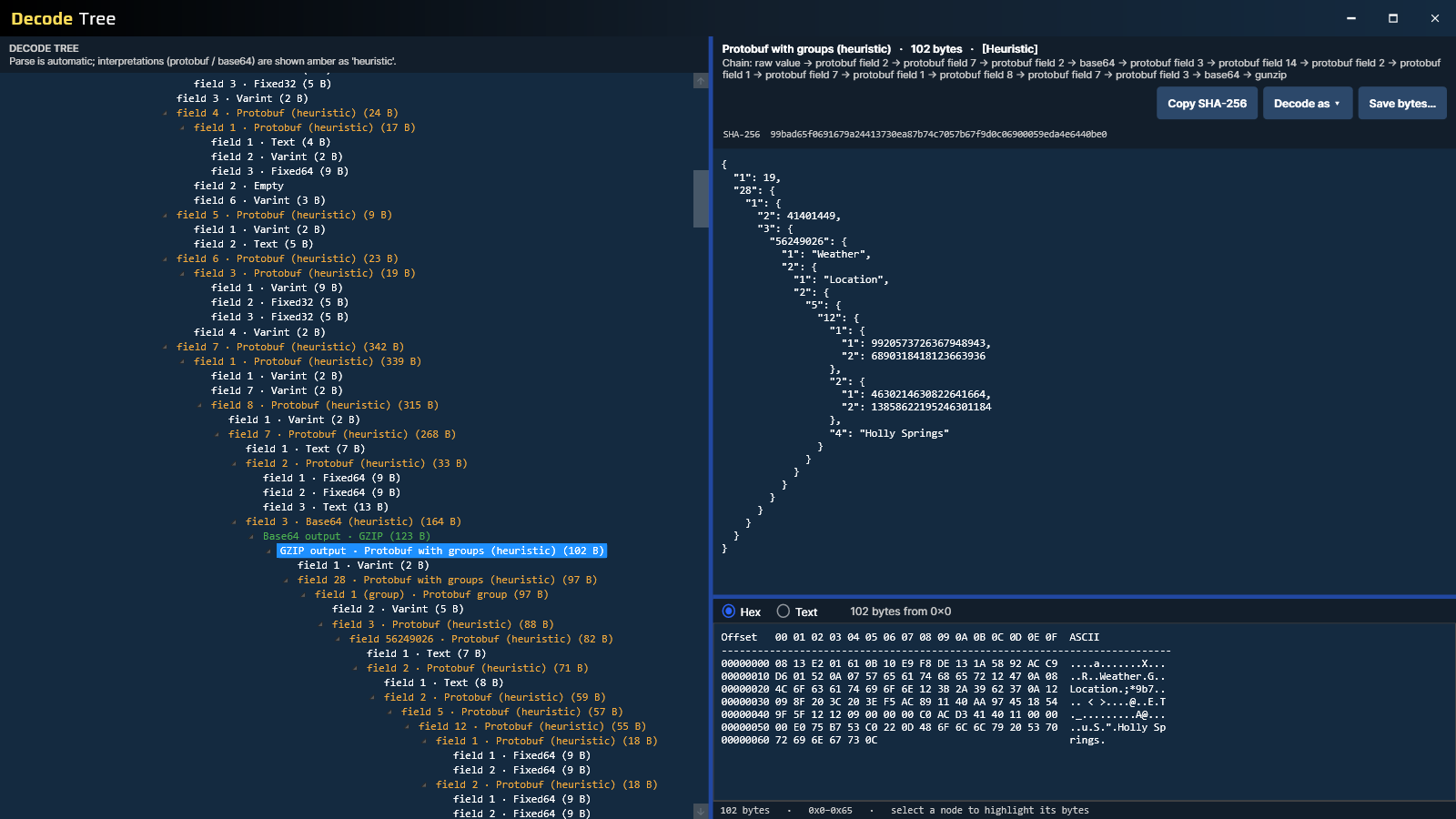
Firefly Decode Tree showing nested and embedded app data
Decode Tree

Supporting files and nested data

Open Apple Plists, XML, Android Binary XML and JSON, then follow supported embedded content through Decode Tree. Each decoded layer stays connected to the source it came from.

Plist XML / ABX JSON Base64 GZIP Protobuf
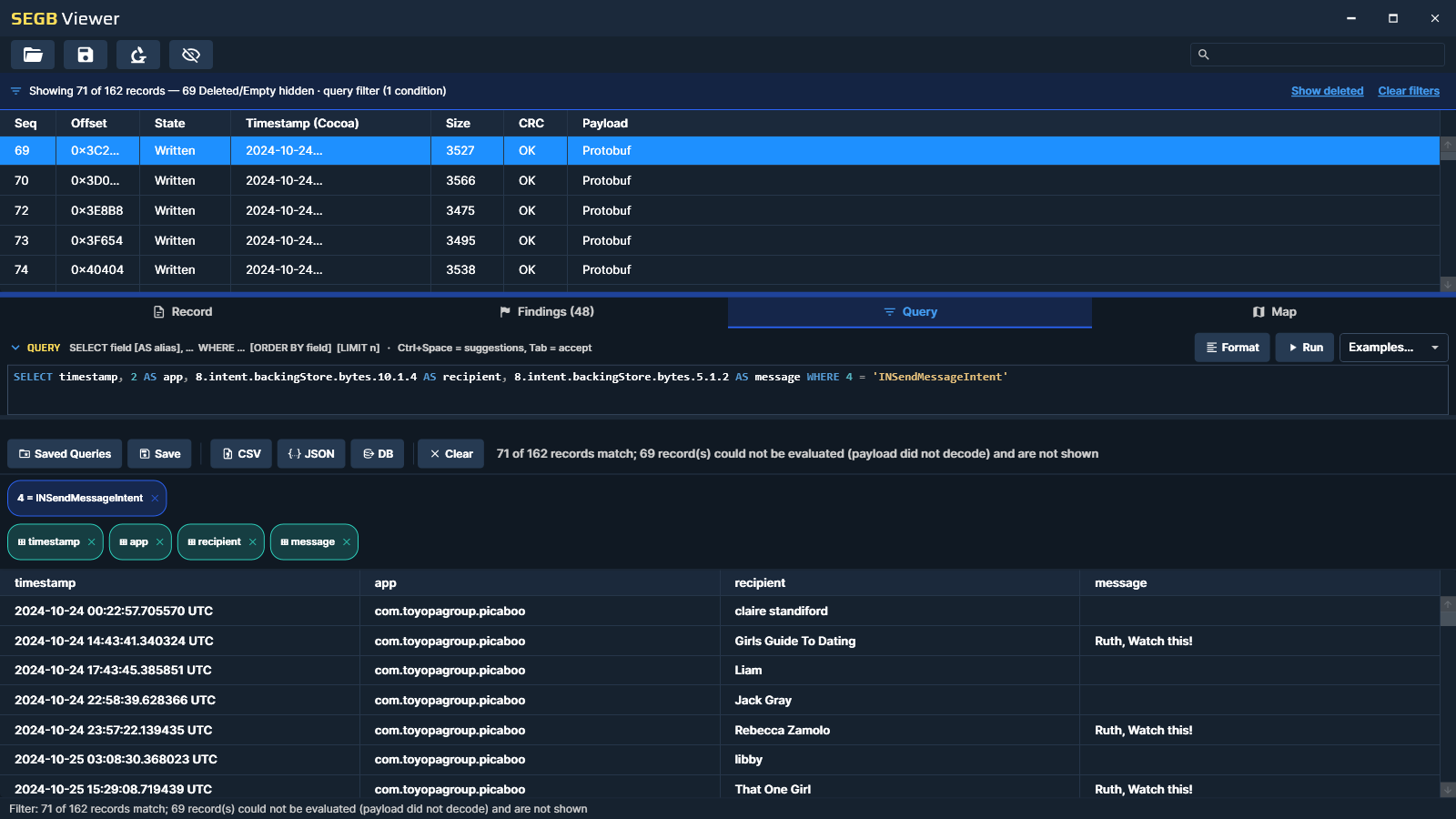
Firefly SEGB Viewer showing queryable Apple Biome records
Apple app data

Apple Biome / SEGB

Decode supported Biome streams, query records with SEGBQL and review findings such as coordinates, URLs, email addresses, phone numbers, search queries and device identifiers.

SEGB Viewer SEGBQL Location Identifiers
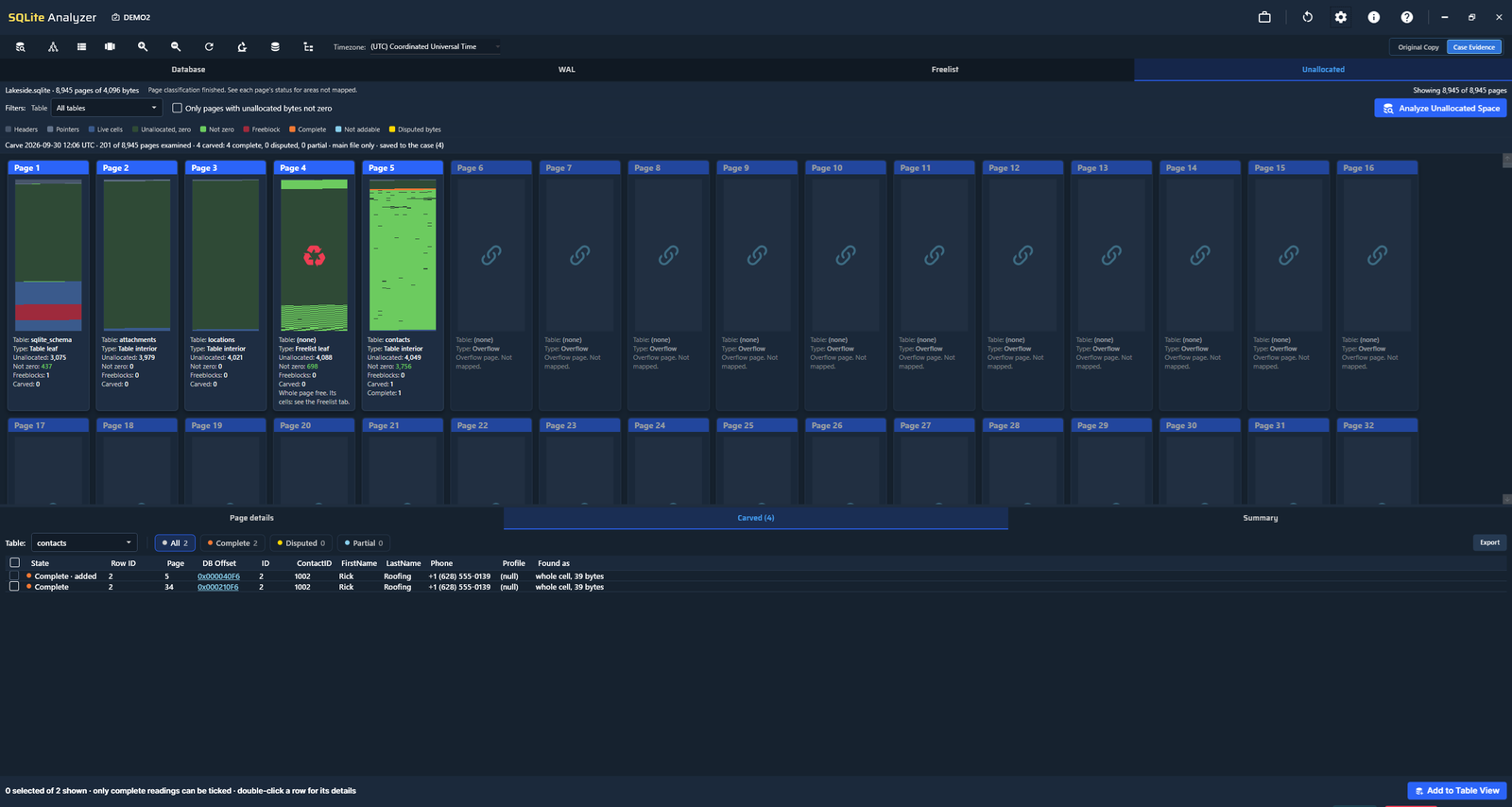
Firefly Unallocated tab showing free space inside SQLite pages and carved records
Recovery

Surviving record data

Recover records from SQLite databases where data remains: in WAL frames, rollback journals, the freelist and the unallocated space on every page. Carved results carry their status, their source and the limits of the method that produced them.

WAL Journal Freelist Unallocated space Status and source
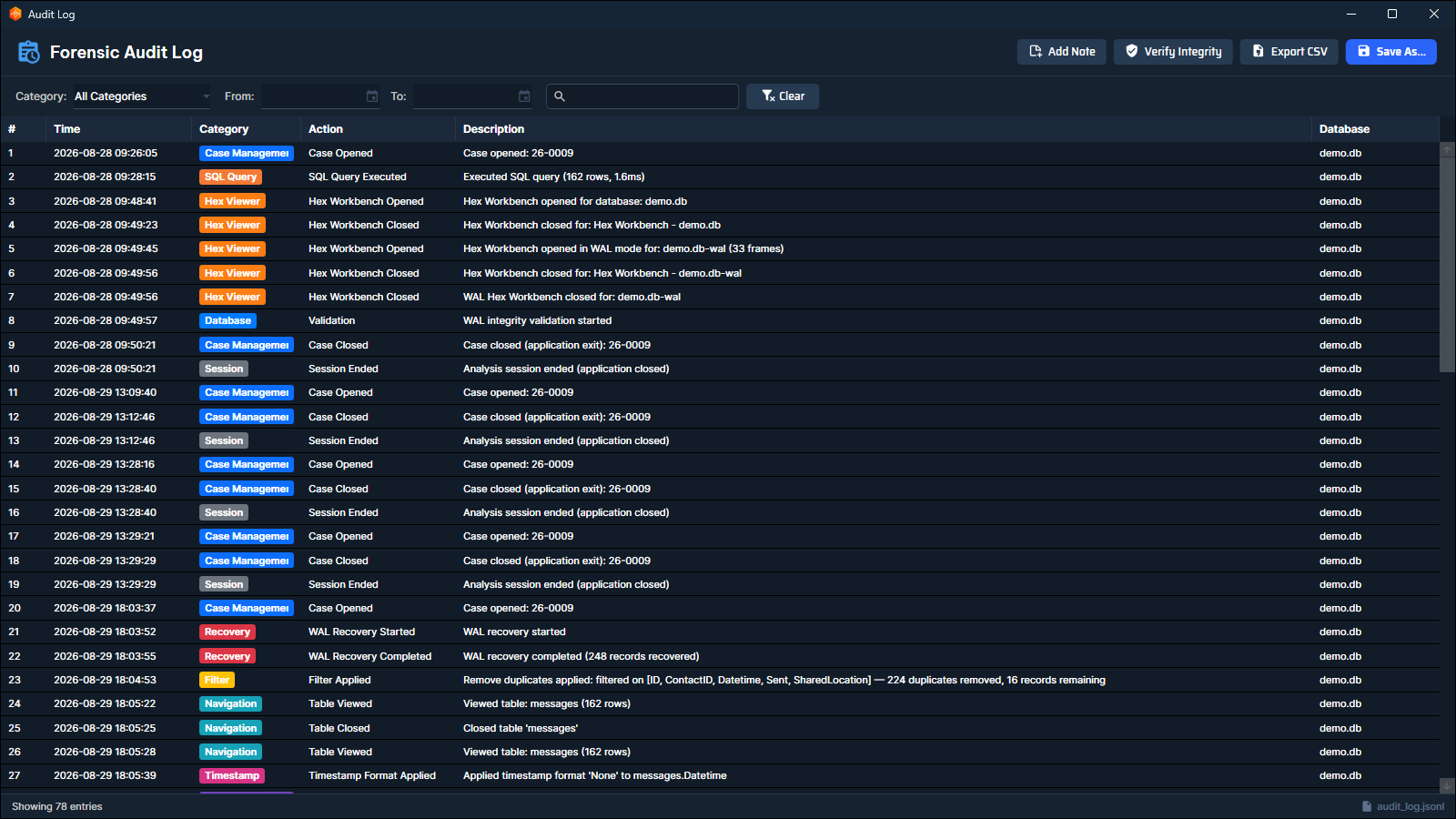
Firefly forensic audit log supporting integrity and provenance
Traceability

Integrity and provenance

Work on a copy while the evidence stays read-only. Firefly records a SHA-256 baseline of the evidence before opening it, flags files that change, and keeps a tamper-evident audit log of every action, on by default.

Read-only SHA-256 baseline Audit log
A Firefly Decode Report showing an artifact's decoded layers, the decode tree and an image recovered from inside it
Share the analysis

Reporting

Create self-contained interactive HTML reports from a table view, with your selected columns, aliases, interpreted timestamps and sort order, or a Decode Report that shows an artifact layer by layer. Reports open in a browser without Firefly.

Interactive HTML Decode Report CSV export

See Firefly live

Curious how Firefly could support your forensic workflow? Book a live demo and see the platform in action.

Analyzers

Each database gets its own Analyzer

The storage engines differ, so each Analyzer is built for the way its own format stores, updates and discards records.

SQLite

SQLite Analyzer

Build queries visually or write your own SQL, recover deleted rows, and work through WAL frames, rollback journals, the freelist and the free space inside pages. Encrypted SQLite (SQLCipher) opens in the same Analyzer.

LevelDB

LevelDB Analyzer

Read key and value pairs across log files and SSTables, examine tombstoned entries and decode nested Protobuf inside the values.

RealmDB

RealmDB Analyzer

Explore objects, classes and schemas, and recover deleted records where a usable representation still survives in the file.

IndexedDB

IndexedDB Analyzer

Parse object stores, decode the keys and recover deletions, reading through the LevelDB layer that browsers and apps keep them in.

Who Firefly is for

Built for teams who need source-backed findings

Public safety & justice

For examiners, investigators, prosecutors and defense teams who need source-backed findings they can stand behind in court.

Corporate enterprise & eDiscovery

For forensic teams, eDiscovery examiners, litigation support and counsel who need clear, reviewable app data evidence.

Military & intelligence

For CID teams, field investigators and intelligence analysts who need fast access to app data findings, activity and location data, with source context.

Any tool can show you a value. The real question is whether you can prove where it came from. That is what we built Firefly around: recover what survives in the file, interpret it in context, and keep a clear path back to the source, so a finding holds up when it is questioned.
James Eichbaum

Head of Product & Training
Co-founder Elusive Data


Questions and answers

Elusive Data Firefly Knowledge Center

Answers about Firefly workflows, supported app data, recovery, provenance, licensing, deployment and purchasing.

Topic

Why Firefly

Why a specialist app data workspace can be needed after extraction, where Firefly fits and what makes its approach different.

What is Elusive Data Firefly?

Elusive Data Firefly is a forensic workspace for app data investigations after extraction. It brings supported SQLite, RealmDB, LevelDB, IndexedDB and Apple Biome / SEGB work into one environment for recovery, interpretation, validation and reporting.

Its defining principle is provenance: findings remain connected to the source context needed to understand and review them.

What technical facts should evaluators know about Firefly?

Firefly combines specialist app data analysis, integrity controls and local deployment in one forensic workspace.

  • Historical and deleted-record examination: available where recoverable data remains in supported source files.
  • Recursive nested-data decoding: Decode Tree examines supported nested and embedded content while keeping each decoded layer connected to its source.
  • Timestamp interpretation: nearly 20 timestamp formats, with the likely readings ranked.
  • Location analysis: coordinates on maps across the Analyzers and viewers, with animated route playback in SQLite Analyzer.
  • Encrypted SQLite: Encrypted SQLite (SQLCipher) support.
  • Evidence handling: read-only, on a copy, with a SHA-256 baseline of the evidence files recorded before they are opened.
  • Audit log: a tamper-evident, hash-chained audit log, on by default, with an integrity check the examiner can run.
  • Forensic Assistant: optional and off by default, with a local-model option and a default policy that keeps record content on the workstation.
  • Command line: a headless mode in SQLite Analyzer for triage, scripted checks and verification.
  • Reporting: interactive HTML reporting that preserves analysis context.
  • Platform: Firefly is installed on the examiner's workstation and runs there, on Windows 10 and Windows 11.
  • Architecture: native x64 and ARM64 support, with a separate ARM64 installer.
  • Analyzers: SQLite Analyzer, RealmDB Analyzer, LevelDB Analyzer and IndexedDB Analyzer can be used within the Firefly workspace, depending on the Firefly version.
Why might I need Firefly when I already use other forensic tools?

Extraction and broad forensic platforms solve essential parts of the workflow, but decoded output does not always answer the investigative question. Apps can be unsupported, updates can change data structures, results can conflict, and important context may remain in the source files.

Firefly is the specialist layer for those moments. It lets the examiner continue into supported app data without replacing the tools already used for acquisition, extraction and broader case review.

What makes Firefly's approach different?

The combination and the depth of the workflow: supported app database analysis, recovery where data survives, nested-data and timestamp interpretation, source-level inspection, provenance and interactive reporting, in one workspace on the examiner's own workstation.

Firefly is designed to help an examiner explain what a finding means, where it came from and how it was reached. The SQLite forensic tool guide explains the evaluation criteria in more detail.

I already work with SQLite forensics. What will feel familiar in Firefly?

Most of the SQLite workflow: reading tables, building queries, examining WAL and journal content, and looking for records that are no longer in the live table.

Firefly adds visual query building, validation down to page and byte offset where available, and the same post-extraction method carried into RealmDB, LevelDB, IndexedDB and Apple Biome / SEGB.

Does Firefly replace an extraction tool?

No. Extraction brings data into the case. Firefly strengthens what happens afterwards by helping the examiner investigate supported underlying app data, recover what remains, validate interpretations and report with source context.

Where does Firefly fit in a digital forensics workflow?

Firefly begins after extraction. It sits between the source files available to the examination and the examiner's final conclusions, providing a connected workspace for deeper app data analysis when ordinary decoded output is incomplete, unsupported, conflicting or needs source-level validation.

What does “go beyond decoded output” mean?

It means continuing the investigation when a parser's interpretation is not the end of the question. That may involve examining underlying app data, looking for recoverable historical or deleted records, decoding nested content, checking timestamps or validating an important value against its source.

You can also read the idea behind Firefly.

What is app data forensics?

App-data forensics examines the files and data structures applications use to store information, including databases, transaction files, nested content and supporting files. It allows an examiner to study records, relationships, timestamps and source context rather than relying only on an application's decoded presentation.

Is Firefly only a SQLite forensic tool?

No. SQLite is a central part of Firefly, but the workspace also supports RealmDB, LevelDB, IndexedDB and Apple Biome / SEGB, together with viewers and decoders for additional app data sources. Capabilities vary by format and by Firefly version.

What does “one workspace” mean in Firefly?

It means supported recovery, interpretation, validation, viewers, byte-level inspection and reporting can remain in the same Firefly environment. This reduces the need to move evidence and context through a chain of disconnected utilities.

Does every examination need Firefly?

Not every step of every case requires deeper app data analysis. If decoded output fully answers the question and no additional validation is needed, an examiner may not need Firefly for that task. Its value becomes clear when the investigation must continue beyond what the standard view provides.

Topic

What Firefly Helps You Do

Practical outcomes for examiners, reviewers and teams working with app evidence after extraction.

What practical outcomes is Firefly designed to support?

Firefly is designed to help teams reduce the risk of missed app evidence, increase confidence in important findings, create a more consistent specialist workflow and make results easier to review. In practical terms, it brings recovery, interpretation, validation and reporting together while retaining a path back to source.

How can Firefly reduce the risk of missed app evidence?

Missed app evidence is relevant app data that was not surfaced in the decoded output available to the examiner. Firefly gives the examiner a route into supported underlying data when output is incomplete, unsupported or conflicting, so structures and records that remain in the source can be examined directly.

This does not guarantee that deleted or unparsed evidence exists or can be recovered.

Why can app evidence be missed after extraction?

Applications and storage structures change constantly. Support varies between tools and versions, and an app update can change a schema faster than a parser can be updated. Even a supported app may contain versions, edge cases or records that are not interpreted as expected.

Can Firefly help with an unsupported or recently updated app?

Potentially. If relevant source data is available in a format Firefly supports, the examiner can continue at the database or app data level instead of depending only on an application-specific parser. Firefly does not promise automatic interpretation of every unsupported app.

Can Firefly help when decoded results are incomplete or conflicting?

Yes, where the relevant supported source data is available. The examiner can inspect records, timestamps, structures and underlying bytes in context, then compare that source-level view with the decoded interpretations already in the case.

Can Firefly be used as a second tool to verify another tool's result?

Yes, and it is one of the main reasons examiners reach for it. Different tools read the same bytes differently, which is why many laboratories run more than one.

Firefly lets an examiner take an important finding and examine the underlying data independently, then keep the analysis context with the result, so a colleague, a quality reviewer or a court can follow how the conclusion was reached.

How does Firefly help validate an important finding?

Firefly is designed to move an examiner from an interpreted value back toward its source. Depending on the Analyzer and source format, that may include the source file, page, byte offset, surrounding structure and direct inspection of the underlying bytes.

How can Firefly strengthen capability across a forensic team?

It puts specialist app data workflows into a consistent environment that multiple examiners can learn and review. Technical champions can perform deeper analysis while lab managers and quality reviewers gain clearer source and process context around critical findings.

How can Firefly make findings easier to review or defend?

By preserving the relationship between the interpretation, the analysis performed and the underlying source context. Another examiner, a quality reviewer, counsel or a court can more readily follow what was found, where it came from and how the conclusion was reached.

Topic

Data & Analyzers

Supported app data formats, dedicated Analyzers, query building, decoding, source-level tools, viewers, interpretation features and the command line.

Which databases and app data formats does Firefly support?

Firefly includes dedicated analysis workflows for SQLite, RealmDB, LevelDB and IndexedDB, plus Apple Biome / SEGB. It also includes tools for supporting and nested data such as Apple Plists, JSON and XML / Android Binary XML.

Capabilities differ across source formats, Analyzers and Firefly versions. See the current overview on the Firefly product page.

Which specific apps does Firefly support?

Firefly works at the data layer rather than per application, so it does not maintain a list of named apps.

If an app stores its data in a format Firefly supports, such as SQLite, RealmDB, LevelDB, IndexedDB or Apple Biome / SEGB, the examiner can open those files and work with the records, structures and nested content directly. That is what makes the approach useful when an app is new, unsupported or recently updated.

Does Firefly work with both Android and iOS app data?

Yes. Firefly works from the files an extraction produced, so the operating system that created them does not decide whether they can be opened. What matters is the storage format.

Android apps commonly use SQLite, LevelDB and Android Binary XML. iOS apps commonly use SQLite, Apple Plists, NSKeyedArchiver and Apple Biome / SEGB. All of those are supported.

What does the examiner open in Firefly?

The examiner opens the source files themselves. Firefly opens app databases and supporting files, including SQLite databases together with their WAL, SHM and journal files, RealmDB files, Plists, XML and Android Binary XML, and JSON. LevelDB and IndexedDB are opened as the folder that holds them.

Does Firefly import a complete extraction package?

No. Firefly does not import a complete extraction package. The examiner selects the relevant files or folders produced by the extraction and opens those supported sources in Firefly.

What is SQLite Analyzer?

SQLite Analyzer is Firefly's dedicated environment for forensic examination of SQLite data. It supports work with database records, internal structures, WAL context, recoverable information where available, timestamp interpretation, source validation and related SQLite forensic tasks.

Can I build SQL queries visually in Firefly?

Yes. SQLite Analyzer includes a visual query builder, so tables, columns and joins can be assembled without writing SQL by hand.

The generated SQL stays visible and editable, so the examiner can see exactly which query produced a result and adjust it rather than trusting a hidden step. Firefly also includes SQL autocompletion and a set of forensic query templates for common tasks.

What is RealmDB Analyzer?

RealmDB Analyzer provides a dedicated workflow for supported RealmDB examination in Firefly, allowing records and relevant residual structures to be investigated while retaining their connection to source context.

What do LevelDB Analyzer and IndexedDB Analyzer do?

They provide dedicated workflows for examining supported LevelDB and IndexedDB data, including relevant records and storage structures, inside the same forensic workspace. The exact recovery and interpretation capabilities depend on the source and data available.

Does Firefly support Apple Biome / SEGB?

Yes. Firefly supports Apple Biome / SEGB examination, including a dedicated SEGB viewer for supported source data. Current capabilities include working with Biome streams and extracting relevant patterns in context.

Does Firefly support Encrypted SQLite (SQLCipher)?

Yes. Firefly includes Encrypted SQLite (SQLCipher) support.

What is Decode Tree?

Decode Tree recursively examines supported nested and embedded content while keeping each decoded layer connected to the data it came from. This can reduce the need to unpack layered structures manually with separate utilities.

Can Firefly decode Protobuf, and can I use my own .proto schema?

Yes to both. Decode Tree recognizes Protobuf content inside a value and decodes it, and the examiner can import a .proto schema so the fields are named rather than numbered.

Without a schema the field numbers and wire types are still shown, so the content can be examined before a schema is available.

Can Firefly read NSKeyedArchiver, binary plists and Apple TypedStream?

Yes. All three are handled by Decode Tree, which follows an embedded structure through each layer and keeps every layer connected to the one it came from.

Apple TypedStream matters in message analysis, where the readable text of a message can sit inside an archived attributedBody value rather than in a plain text column.

What is Hex Workbench?

Hex Workbench provides direct inspection of underlying bytes when an interpretation requires deeper source-level verification. It helps the examiner move between a higher-level finding and the source data behind it.

What is the B-Tree Analyzer?

SQLite stores tables and indexes as b-trees of pages. The B-Tree Analyzer lets an examiner walk that structure page by page and cell by cell: how a record is placed, how a page is read and where free space sits inside it.

It is the view to use when the question is about the database file itself rather than about the rows it presents.

What is Record Reconstruction?

A record in free space can survive without the header that says how long each of its fields is. Record Reconstruction rebuilds such a record from what remains, using the table's own structure, so the examiner can read the content and judge it.

The result states what was reconstructed and what was not, so a partial reading is never presented as a complete one.

Which built-in viewers are available?

Firefly includes dedicated viewers for supported Plist, JSON, SEGB and XML / Android Binary XML data, together with Decode Tree and Hex Workbench. Availability and depth can vary by source and Firefly version.

How does Firefly handle timestamps?

Firefly reads nearly 20 timestamp formats and ranks the likely readings of a value rather than presenting one assumed answer. The interpreted time always stays next to the raw value and its source context.

The most likely reading is a ranking, not a finding: the examiner confirms the format, for example against a second artifact or the application's own behavior, before a time goes into a report.

Which timestamp formats does Firefly interpret?

Nearly 20, grouped by kind. They include Unix time in seconds, milliseconds, microseconds and nanoseconds, Windows FILETIME, Apple Cocoa Core Data time, Chrome / WebKit time, SQLite Julian Day, OLE Automation Date and ISO 8601, along with several network and protocol formats.

A column can also be read as a chosen format when the examiner already knows which one applies, so a known schema is not overruled by a guess.

Can I filter records by date range?

Yes. Once a column has a timestamp format, it can be filtered by date range in the table view, with quick ranges such as Today, Last 7 Days or This Month, or with dates of your own. Date filtering is available in the interactive HTML report as well.

Can Firefly show locations on a map and play back a route?

Yes. Animated route playback is available in SQLite Analyzer: the table steps through the rows in sequence and a marker follows the route on the map.

Coordinates are also shown on maps in RealmDB Analyzer, LevelDB Analyzer, IndexedDB Analyzer, the SEGB Viewer, Decode Tree and the HTML reports, without playback.

Map backgrounds need a network connection. Without one, the coordinates are shown on a grid.

Does Firefly work with SQLite WAL, SHM and journal files?

Yes. When the main SQLite database is selected, matching -wal, -shm and -journal files are included automatically in Firefly's working copy.

Can Firefly run from the command line?

Yes. SQLite Analyzer has a headless mode that runs from the command line with no window, using the same engines as the application. It is built for:

  • Triage at scale: a machine-readable inventory of a folder of databases, with headers, PRAGMAs, schema, hashes and recoverability hints.
  • Verifiable searching: a database-wide search that states what it did not cover, and a lookup of what a byte offset belongs to.
  • Verification: checking an audit log's tamper-evident hash chain, or running the built-in test suite, from a script with meaningful exit codes.
  • Scripted preprocessing: WAL, journal and SQLCipher recovery diagnostics across a case's databases before deciding which ones need interactive analysis.
Can different Firefly Analyzers be used in the same workspace?

Yes. Firefly is designed as one workspace for supported app data investigations. Which Analyzers are available to an examiner depends on the Firefly version in use.

Are capabilities identical across every Analyzer and source format?

No. The underlying storage technologies differ, so recovery, provenance, interpretation and visualization capabilities are not necessarily identical across SQLite, RealmDB, LevelDB, IndexedDB, Apple Biome / SEGB and other supported sources.

Topic

Recovery & Provenance

What recovery means, what determines whether data remains available and how Firefly keeps findings connected to source.

Can Firefly recover deleted or historical app data?

Firefly can examine and recover historical or deleted records where recoverable data remains in supported source files. What can be recovered depends on the source format, the files available, how the application stored the data and the condition of the remaining structures.

Can Firefly recover deleted chat messages?

Sometimes, and the honest answer depends on the file rather than on the app's name.

Many messaging apps store messages in SQLite. When a message is removed, the bytes often remain for a while in the WAL, a rollback journal, a freelist page or the free space inside a page. Firefly examines those structures and reports what it finds together with the method that found it.

If the bytes have been overwritten, no tool can bring them back.

Does Firefly guarantee deleted-data recovery?

No. Historical app data can include earlier, modified, replaced or deleted records that are no longer represented in the application's current logical view. It can only be recovered when a usable representation still remains in supported source files, and recovery differs across formats.

What is the difference between a deleted record and an earlier version of a record?

It matters a great deal, and Firefly keeps the two apart.

When a row is updated, the previous version can survive elsewhere in the file. That earlier version is not a deleted record: it is a state the row used to be in. Firefly reports it as an earlier state rather than flattening it into a deletion.

Where the available evidence does not establish which of the two applies, Firefly says so instead of choosing one.

Does a recovered record prove that something was deleted?

No, and Firefly does not present it that way. A record found in free space, a freelist page or a journal is data that is no longer part of the live table. How it got there is a separate question, and the answer depends on how the application and the database engine behaved. Firefly reports where a record was found and by which method, so the examiner can judge what it means.

What determines whether a deleted record is recoverable?

It depends on the available source files, storage technology, application behavior and whether relevant structures still contain usable information. If the relevant bytes or structures have been overwritten and no recoverable representation survives elsewhere in the available files, Firefly cannot recreate the original content.

Can Firefly examine WAL, freelist, journal and freeblock data?

Where supported and where relevant data remains, Firefly's SQLite workflow can examine the structures used in historical and deleted-record analysis, including WAL frames, rollback journals, the freelist, freeblocks and the unallocated space inside pages. Recovery results state the method that produced them.

What does provenance mean in Firefly?

Provenance is the path from an interpretation or finding back toward the source data it came from. Firefly is built to retain that relationship so an examiner or reviewer can understand how an important result was reached.

What source context can Firefly preserve?

Depending on the source and Analyzer, context can include the source file, database structure, page, byte offset, surrounding records, recovery mechanism and underlying bytes. Not every element applies identically to every format.

Can the examiner inspect the bytes behind a finding?

Yes, where applicable. Hex Workbench supports direct source-level inspection when an interpretation needs to be checked against the underlying data.

Topic

Integrity, AI & Reporting

Read-only handling, the SHA-256 baseline, the audit log, what the Forensic Assistant sends and reports that preserve analysis context.

Does Firefly modify the original evidence?

No. Firefly works on a copy and never writes to the original. It records a SHA-256 baseline of the evidence files before opening them and flags any file that changes.

What does the SHA-256 baseline do?

Before the evidence is opened, Firefly records a SHA-256 hash of each evidence file. When the case is opened again, the files are checked against that baseline, and any file that has changed is flagged. This documents that the data being reviewed is the data the examination started from.

What is the tamper-evident audit log?

Every examiner action is recorded in a tamper-evident, hash-chained audit log, which is on by default. Any later alteration of the recorded history becomes detectable.

The examiner can switch logging off at any time, and the log records when it was off, for how long and why. An integrity check, in the application or from the command line, verifies that the recorded history is intact.

Does Firefly use AI, and does my evidence leave the machine?

Firefly includes an optional Forensic Assistant in SQLite Analyzer. It is switched off by default, and nothing is sent anywhere until an examiner turns it on.

  • Where it runs: with a cloud provider, or with a local model. With a local model on the examiner's own machine, nothing leaves the machine.
  • The default policy: under Locked down, only the question, the database file name and the schema and metadata are sent to a cloud provider. Record content is not.
  • Record content: goes to a cloud provider only if the examiner explicitly allows it in Options, and that change is written to the audit log.
  • On record: every question asked is recorded in the audit log.
  • The examiner decides: in Investigator Mode the Assistant works through Firefly's own read-only tools and cites byte offsets that open in Hex Workbench, so every answer can be checked at the source before anything is relied on.
Can our laboratory validate Firefly before using it in casework?

Yes, and that is the normal expectation in an accredited laboratory. Validation is the laboratory's own exercise, usually run against a dataset with known answers.

Firefly supports it in practical ways. Recovery results state the method that produced them, so a tester can see what the tool claims and on what basis. The evidence files are hashed before they are opened, so the same input can be processed again and the output compared. And the headless mode lets checks run from a script.

Contact Elusive Data if it would help to discuss a validation dataset for the workflows your laboratory intends to use.

What kind of reports does Firefly create?

Firefly creates interactive HTML reports designed to preserve analysis context, rather than reducing the examiner's work to a static list of isolated values.

What analysis context can a Firefly report preserve?

Reports can preserve the examiner's working view, including selected columns, aliases, interpreted timestamps and sort order. The purpose is to make the reported result easier to understand and review in the context in which it was analyzed.

Does an exported report need an internet connection to open?

No. A Firefly report is a self-contained HTML file. It opens in a browser on a workstation with no outbound network access, which matters when a report is reviewed inside a restricted environment or handed to a third party.

Map backgrounds in a report are off by default. If one is switched on, it needs a network connection, and without one the coordinates are shown on a grid.

What should security, quality and procurement teams know?

Firefly is installed on the examiner's own workstation and the examination runs there. Evidence handling is read-only, a SHA-256 baseline is recorded before evidence is opened, and a tamper-evident audit log is on by default. The Forensic Assistant is off by default and, when used with a cloud provider, sends no record content unless the examiner allows it. Deployment, offline activation and supported Windows platforms are covered under Licensing & Deployment.

Topic

Who Firefly Is For

How Firefly supports hands-on examiners, technical champions, reviewers, forensic leaders and specialist teams across different sectors.

Who is Firefly built for?

Firefly is built for people who need to investigate, validate, review or rely on app data findings after extraction. That includes forensic examiners, app data analysts, technical champions, investigators, laboratory leaders, quality reviewers and professionals who must explain important evidence to others.

How does Firefly help senior examiners and app-forensic analysts?

It gives technical users a focused environment for source-level app data work, including supported recovery, nested interpretation, timestamp analysis, byte inspection and provenance. The examiner can stay close to the underlying data without assembling a separate workflow for each task.

What value does Firefly provide to lab managers and forensic leaders?

For lab managers, Heads of Forensics and Practice Directors, the value is a more consistent specialist capability across the team, a lower risk that important app data goes unexamined and a clearer review path when a finding is challenged.

How can Public Safety and Justice teams use Firefly?

Law-enforcement forensic labs, cybercrime units, investigators, prosecutors and defense teams can use Firefly when app evidence needs deeper examination or source-backed explanation. The workflow is designed to help practitioners show what was found, where it came from and how it was interpreted.

Is Firefly suitable for private forensic labs and consultancies?

Yes. Private labs and consultancies can use Firefly to deepen app data analysis, validate critical findings and provide clearer source context for client work, expert review and reporting.

Is Firefly relevant to corporate DFIR and eDiscovery teams?

Yes. Corporate forensic teams, eDiscovery examiners, litigation-support professionals and counsel may need app data findings that are reviewable and connected to source, particularly when decoded output is incomplete or a key interpretation must be validated.

How can military and intelligence teams use Firefly?

Military investigative units, CID teams, field investigators, intelligence analysts and national-level laboratories can use Firefly for supported app data, activity and location analysis when processing on the examiner's own workstation and clear source context are important.

Do users need to be developers or SQLite specialists?

Firefly is designed for forensic practitioners, not only developers. The visual query builder means SQL can be assembled without writing it by hand. Deeper knowledge helps with advanced interpretation, and Elusive Data offers digital and mobile forensics training for teams that want to strengthen the underlying skills as well as use the software.

Topic

Licensing & Deployment

CodeMeter licensing, license delivery, offline activation, supported Windows platforms and access after expiry.

How is Firefly licensed?

Firefly is licensed with CodeMeter. The terms for your license are set out in your quote. Get a quote

How is the Firefly license delivered?

The license is delivered as a Cloud Licence, as a Software Licence activated on the examiner's workstation, or on a USB Licence Dongle. The Software Licence and the dongle can both be activated without an internet connection through a CodeMeter file exchange, the standard Wibu update, so an offline lab computer can receive a working license. The dongle also lets the license move between systems.

A current CodeMeter Runtime is required. The Firefly installer checks the version present on the machine and names the version needed, and the runtime is downloaded from Wibu-Systems.

Can Firefly be activated and used without an internet connection?

Yes. The Software Licence and the USB Licence Dongle can both be activated without an internet connection through a file exchange. Once activated, Firefly runs on the workstation without an internet connection.

Map backgrounds are the one exception: they need a network connection, and without one the coordinates are shown on a grid.

Does Firefly run on the examiner's own machine?

Yes. Firefly is installed and runs on the examiner's workstation. Opening evidence, recovery, decoding, analysis and report generation are all performed there, with read-only evidence handling.

Which operating systems and architectures does Firefly support?

Firefly supports Windows 10 and Windows 11, with native x64 and ARM64 support and a separate ARM64 installer.

What happens when a Firefly license expires?

An active license is required to run Firefly, so case files need a licensed installation to be opened. Reports already exported are self-contained HTML files that open in a browser without Firefly, so completed work remains readable.

Topic

Pricing & Evaluation

Firefly versions, quotes, purchasing and seeing Firefly live.

How is Firefly priced?

Firefly is available in two versions: Firefly Base and Firefly All-Access. Pricing depends on the version and the number of licenses. Get a quote and we will send the current options.

What is the difference between Firefly Base and All-Access?

Firefly Base (SQLite Analyzer) is a focused entry point for deep SQLite examination. Firefly All-Access is the broader Firefly platform, for teams working across multiple supported app data technologies.

Which version is right for our team?

Tell us which app data your team works with and how many examiners will use Firefly, and we will recommend a version. Get a quote

Can we get a formal quote for procurement?

Yes. Get a quote and include your organization and any procurement requirements.

Can Firefly be purchased through a partner?

Elusive Data works with selected partners. Get a quote and we will confirm the right purchasing route for your region.

How can we assess whether Firefly fits our workflow?

Start with the source formats, investigative questions and reporting needs your team handles. A live walkthrough can then focus on the relevant Firefly workflows and show how findings remain connected to source context. Book a demo

Can we see Firefly working live?

Yes. A live walkthrough can focus on the source formats and investigative questions most relevant to your team. Book a demo

Topic

Expertise & Training

The practitioner experience behind Firefly, how examiner feedback informs development and where to learn more.

Why was Firefly developed?

Firefly grew from James Eichbaum's experience as a digital-forensics practitioner and instructor. A recurring problem was not extraction itself, but what happened afterwards when decoded output did not answer every question and an examiner needed to work with the underlying app data.

Who is behind Firefly?

Firefly is developed by Elusive Data. Co-founder James Eichbaum leads product and training, with development informed by work with forensic practitioners across training, demonstrations, evaluations and customer use.

What is James Eichbaum's digital forensics background?

James is a digital-forensics instructor and practitioner. Before co-founding Elusive Data, he worked at MSAB as a trainer and later Global Training Manager. His work focuses on mobile forensics, SQLite analysis and practical investigative workflows.

How does Elusive Data's training background influence Firefly?

Training exposes recurring examiner questions: how to understand a structure, validate an interpretation, recover additional information and show another person where a result came from. Those practical needs directly inform Firefly's focus on visual analysis, source context and reviewable outcomes.

How does practitioner feedback influence Firefly?

Feedback and feature requests from forensic practitioners are important inputs into product development. Requests are assessed against product scope, technical feasibility, testing and priorities rather than being promised automatically.

How often is Firefly updated?

Firefly is actively developed. Release timing varies according to feature readiness, testing and priorities, so current product and release information is the best source for capabilities available at a particular time.

Is forensic training available alongside Firefly?

Yes. Elusive Data provides digital and mobile forensics training, including specialist SQLite forensics training. Training is available in several delivery formats, and the training and software sides of Elusive Data are closely connected.

Where can I learn more or ask a specific question?

Review the Firefly product page, read the story behind Firefly, open the Firefly brochure, or contact Elusive Data with a technical, licensing or procurement question.

Firefly capabilities differ across source formats, Analyzers and Firefly versions. Historical and deleted-data examination depends on recoverable data remaining in supported source files. Answers reviewed October 2026 for Firefly 1.0.3.

Still deciding whether Firefly fits your workflow?Book a demoGet a quote
Reference

Firefly, specified

Analysis

Analyzers
SQLite, Encrypted SQLite (SQLCipher), RealmDB, LevelDB and IndexedDB, each with its own dedicated workflow
Apple app data
Apple Biome / SEGB, with the SEGB Viewer and SEGBQL queries over the decoded records
Querying
Visual query builder with the generated SQL visible and editable, SQL autocompletion and a set of forensic query templates
Nested content
Decode Tree follows supported embedded layers through Base64, GZIP, Protobuf, Apple Plist, NSKeyedArchiver and Apple TypedStream, and keeps every layer connected to the one it came from
Schemas
A .proto schema can be imported so Protobuf fields are named rather than numbered
Viewers
Plist, JSON, XML and Android Binary XML, SEGB, and Hex Workbench for byte-level inspection
Timestamps
Nearly 20 formats, including Unix time in seconds, milliseconds, microseconds and nanoseconds, Windows FILETIME, Apple Cocoa Core Data, Chrome / WebKit time, SQLite Julian Day and ISO 8601, with the likely readings ranked instead of a single assumed answer
Date filtering
Date-range filters on any column with a timestamp format, in the table view and in the interactive report
Location
Animated route playback in SQLite Analyzer. RealmDB, LevelDB and IndexedDB Analyzer, the SEGB Viewer, Decode Tree and the HTML reports show coordinates on a map
Search
Database-wide search across tables and columns, stating which tables it searched and which it skipped
Command line
Headless mode in SQLite Analyzer for triage across many databases, scripted recovery diagnostics and audit-log verification

Recovery

SQLite
WAL frames, rollback journals, freelist pages, freeblocks and the unallocated space inside every page
Partial records
Record Reconstruction rebuilds records that survive without a complete header
Page level
B-Tree Analyzer for page and cell examination
Attribution
Recovery results state where they were found and the method that produced them
Limits
What can be recovered depends on the files available and on recoverable data remaining in them. A recovered record is not by itself proof that something was deleted

Evidence integrity

Handling
Read-only. Analysis runs on a copy and the original evidence is never written to
Validation
A SHA-256 baseline of the evidence files is recorded before they are opened, and any file that changes is flagged
Audit
Tamper-evident, hash-chained audit log, on by default. The examiner can switch it off, and the log records when and why. Its integrity can be checked in the application or from the command line
Provenance
File, page and byte offset kept with the finding where those details are available
AI Assistant
Optional and off by default. Can run on a local model. Under the default policy, no record content is sent to a cloud provider unless the examiner allows it

Reporting

Format
Interactive HTML, self-contained in a single file
Offline
Opens in a browser on a workstation with no outbound network access. Map backgrounds are off by default and need a network connection when switched on
Context
Selected columns, aliases, interpreted timestamps and sort order are preserved as the examiner left them
Export
CSV of the working view

Platform and licensing

Operating system
Windows 10 and Windows 11
Architecture
Native x64 and ARM64, with a separate ARM64 installer
Deployment
Installed and run on the examiner's workstation. Analysis, decoding and reporting all happen locally
Licensing
CodeMeter, delivered as a Cloud Licence, a Software Licence or a USB Licence Dongle
Activation
The Software Licence and the dongle can be activated offline through a file exchange. The dongle also moves the license between systems
Versions
Firefly Base (SQLite Analyzer) and Firefly All-Access
Pricing
On request, by version and number of licenses
Availability
The Analyzers available to an examiner depend on the Firefly version in use