When investigators search for a SQLite forensic tool, the real need is rarely just to open a database. A standard database view can show tables and rows, but forensic work often depends on understanding where a record came from, whether it was deleted, how it changed over time and how confidently it can be explained in a report.
That is why modern app-data forensics needs more than a generic viewer. A useful workflow connects SQLite structures, application context, recovery, validation and reporting without losing the path back to the source.
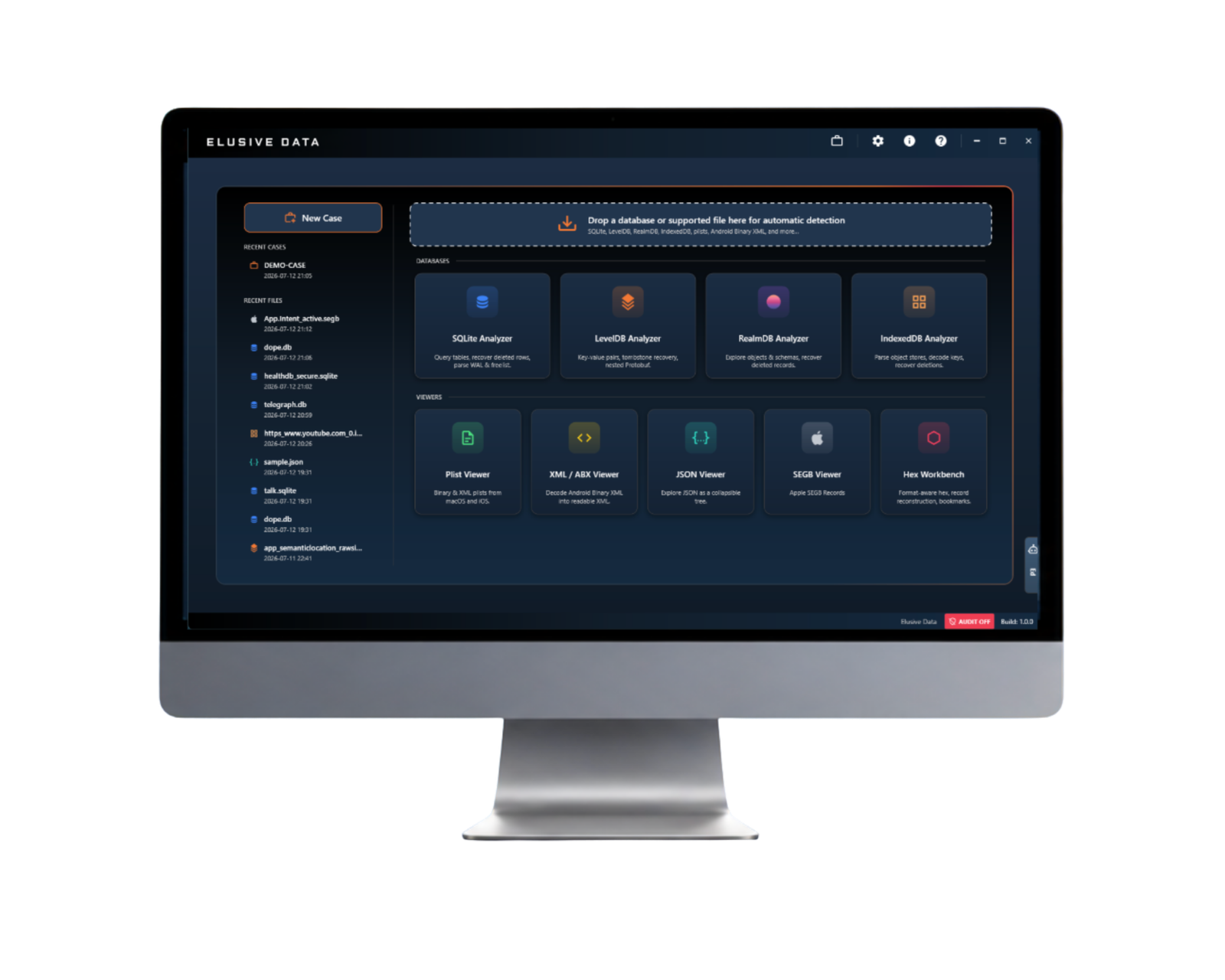
This is the direction behind Svårfångad databagge. Firefly begins with the same source-backed questions investigators ask in SQLite work, then carries that workflow across modern app data. It is a forensic workspace for SQLite, RealmDB, LevelDB, IndexedDB and Apple Biome / SEGB, built to help examiners recover what remains, interpret it in context, validate findings against the source and report with provenance preserved.
- SQLite forensic tool
- RealmDB forensic tool
- App-data forensics
- Source-backed findings
- Firefly
- Provenance
The broader point
Someone searching for the best SQLite forensic tool may actually be facing a larger app-data problem. SQLite may be the starting point, but modern evidence often spans RealmDB, LevelDB, IndexedDB, Apple Biome / SEGB, BLOBs, timestamps, sidecars and nested structures. Firefly is built for that wider source-backed workflow.
A forensic tool is different from a database viewer
A database viewer is useful when the examiner needs to browse tables, inspect columns or run simple queries. That can be a helpful first step. But SQLite evidence is not always limited to the active rows currently visible in a table.
In forensic work, the important context may sit in WAL frames, freelist pages, freeblocks, overflow pages, BLOBs, raw database pages, timestamp fields, application-specific encodings or sidecar files. Sometimes the value in a parsed table is only one part of the story.
A SQLite forensic tool becomes useful when it helps the examiner move between the interpreted value and the source structure that supports it. That movement is what turns a database value into an explainable forensic finding.
Why SQLite evidence needs more than table browsing
SQLite is widely used in mobile, desktop and browser-based applications. It can store messages, notes, settings, timestamps, contact data, media references, location records, browser artifacts, health data, payments and custom application state.
In many investigations, the active table view is helpful but incomplete. A record may have been updated, deleted, moved, partially overwritten or preserved in another structure. A WAL file may hold a page version that is not visible in the main database. A freelist page or freeblock may preserve recoverable content until it is reused.
This is why forensic SQLite analysis is less about simply opening a file and more about following the evidence. Where did this value come from? Which structure contained it? Is it current, historical, deleted or recovered? Can another examiner follow the same reasoning?
WAL and SHM awareness adds important context
A strong SQLite forensic workflow gives the examiner a way to understand the main database together with its supporting files. In WAL mode, the write-ahead log records changed database pages before they are checkpointed back into the main database. That can make the WAL important for recent activity, historical page versions and recovered context.
SHM sits in a different role. The SHM file is part of SQLite’s WAL-index mechanism and helps coordinate access and locate frames in the WAL. It is useful for understanding WAL behavior, but it is not the same as treating the main database or WAL file as a direct source of database content.
Forensic tools that make those relationships visible help investigators avoid a narrow view of the evidence. The examiner can see not only the value, but the path that led to the value.
What makes the best SQLite forensic tool useful in casework?
“Best” depends on the question the investigator is trying to answer. In some situations, the best SQLite forensic tool is the one that quickly opens a database and helps the examiner understand the schema. In other situations, it is the one that helps recover deleted records, compare WAL frames, validate a timestamp or explain a finding in review.
For app-data investigations, the more useful question is often: does the tool help the examiner preserve context?
Useful capabilities to look for
- Source visibility back to the database, page, record, frame or byte offset.
- Recovery context for deleted, historical or partially overwritten data where the source supports it.
- WAL and SHM awareness without overstating what SHM can prove.
- Application context across supporting files, sidecars, BLOBs and nested structures.
- Validation workflows that help compare decoded output with the underlying source.
- Reporting paths that preserve enough context for review and explanation.
A tool does not need to make every decision for the examiner. In many cases, the most valuable tool is the one that shows enough of its work for the examiner to make a careful decision.
RealmDB changes what investigators need from a forensic tool
Investigators searching for a Realm forensic tool or RealmDB forensic tool are often dealing with a different kind of app-data problem. RealmDB is object-oriented and mobile-focused, so the evidence may not appear as familiar rows and columns.
The examiner may need to understand objects, properties, relationships, identifiers and application-specific meaning. The practical question is similar to SQLite work, even though the storage model is different: what does this value represent, where is it stored and what source context supports the interpretation?
This is where a broader app-data workspace becomes useful. Rather than treating SQLite and RealmDB as completely separate worlds, the workflow can stay consistent: inspect the data, interpret it in context, validate the source and carry that context into reporting.
App-data forensics is bigger than SQLite alone
SQLite remains central to many investigations, but modern apps rarely keep every important fact in one neat database table. A single finding may depend on related files, cached data, binary records, encoded values, local storage, timestamps, attachments, database fragments or cloud-sync state.
LevelDB and IndexedDB are common examples in browser-based and cloud-connected workflows. LevelDB stores key-value data. IndexedDB is used by browsers and web applications for structured client-side data. In both cases, the value of a finding often depends on understanding the surrounding application context, not only reading a stored value in isolation.
The more storage formats an examiner has to move between, the easier it becomes to lose provenance. A source-backed workflow helps preserve the relationship between the interpreted result and the supporting artifacts.
Elusive Data Firefly extends the workflow beyond SQLite
Svårfångad databagge is a forensic workspace for app-data investigations. It is built for the work that often begins after extraction: recovering what remains, interpreting records in context, validating findings against the source and reporting results in a way that can be reviewed.
The goal is not to replace the extraction tools investigators already rely on. Extraction tools do the essential job of acquiring and decoding large amounts of data. Firefly supports the next layer of work: examining what the decoded view may not show, keeping findings connected to source artifacts and helping investigators explain how a conclusion was reached.
Firefly brings the source-backed approach across SQLite, including encrypted SQLite, RealmDB, LevelDB, IndexedDB and Apple Biome / SEGB. The common thread is provenance: the path from finding to source, from interpretation to raw data, and from recovery to explanation.
That makes Firefly broader than a single SQLite forensic tool. SQLite remains an important foundation, but the workspace is designed for the way modern application evidence is actually stored: across multiple databases, sidecar files, BLOBs, timestamps, nested records and changing app structures.
Training and tooling support the same habit
Tools are most useful when examiners understand the structures underneath them. That is why SQLite forensics training still matters. Investigators benefit from understanding pages, records, varints, WAL files, deleted data and validation methods before they judge whether a tool result is complete.
The same mindset carries into tool use. A good tool helps the examiner work faster, but it also keeps the source close enough that the finding can be checked. A good course helps the examiner understand what the tool is showing and when a result needs a closer look.
Together, training and tooling help build a more consistent forensic habit: inspect the data, recover what survives, validate the source and explain the finding clearly.
Questions that help compare forensic database tools
When comparing a SQLite forensic tool, RealmDB forensic tool or broader app-data forensic workspace, a few practical questions can keep the evaluation grounded.
- Can the examiner trace a finding back to the source file or structure?
- Does the tool show how a recovered value was surfaced?
- Can WAL, freelist, freeblock or residual structures be reviewed in context?
- Does the workflow help compare decoded output with source data?
- Can the examiner preserve enough context for reporting and review?
- Does the tool support modern app-data formats beyond one database type?
- Does it help the examiner explain uncertainty instead of hiding it?
Those questions are often more useful than asking which tool opens the most files. In forensic work, the answer needs to survive review.
Continue reading
For more on the workspace, visit the Elusive Data Firefly page or read the idea behind Elusive Data Firefly.
To build a stronger SQLite foundation, see the SQLite Forensik or the SQLite Förhörsutbildning vid begäran.
SQLite and App-Data Forensic Tool FAQ
Is Elusive Data Firefly only a SQLite forensic tool?
Elusive Data Firefly includes SQLite analysis, but it is broader than a single-format SQLite forensic tool. It is a forensic workspace for modern app-data investigations across SQLite, RealmDB, LevelDB, IndexedDB and Apple Biome / SEGB, with provenance connecting findings back to source artifacts.
What should investigators look for in a SQLite forensic tool?
Look for more than table browsing. A useful SQLite forensic tool helps connect findings to source structures such as database pages, records, WAL frames, freelist pages, freeblocks and byte offsets.
Why is SQLite important in app-data forensics?
SQLite is used by many applications to store messages, settings, timestamps, records and user activity. Forensic value may appear in active tables, WAL files, freelists, freeblocks, overflow pages or raw database structures.
What is the difference between a database viewer and a forensic tool?
A database viewer helps browse tables and rows. A forensic tool helps preserve source context, recover supported data, validate interpretations and explain where a finding came from.
What should a RealmDB forensic tool help with?
RealmDB analysis often involves object data rather than traditional relational tables. A useful workflow helps examiners understand objects, properties, relationships, identifiers and the app context behind the stored values.
How does Firefly fit into SQLite and app-data investigations?
Firefly treats SQLite analysis as part of a broader app-data workflow. It helps investigators work across SQLite, RealmDB, LevelDB, IndexedDB and Apple Biome / SEGB while keeping recovery, validation, interpretation and reporting connected to provenance.